Previous part: Photon Fusion 2 – Data Synchronisation – Part 3/4.
Ready to put Photon Fusion 2 into practice? In this final part of our series, you’ll learn how to implement real multiplayer features step by step in a simple Unity game. We’ll skip the non-networking stuff and focus on essential multiplayer systems. Session setup, player management, object synchronisation, reconnect logic, and more. By following this guide, you’ll build a solid foundation for scalable, production-ready multiplayer games in Unity.
Introduction
Welcome to the final article in our Photon Fusion 2 beginner series! Here, we’ll take a practical approach – step by step, you’ll learn how to build the multiplayer part of a simple Unity game using Photon Fusion 2. This article won’t give you a complete game, but you’ll focus only on features directly tied to Fusion 2 networking. To keep things clear, we’ll skip unrelated mechanics like UI, loading screens, or single-player logic. Every code sample below delivers a real networking function you can use as a foundation for your own projects. We’ll work with Unity’s basic primitives – planes, cubes and spheres – and supplement them with free assets from the Unity Asset Store.
Game Description
This project focuses on a small part of a larger game to help you learn core multiplayer mechanics you can expand later. You won’t see a complete game loop, but you’ll get a solid foundation for your own projects.
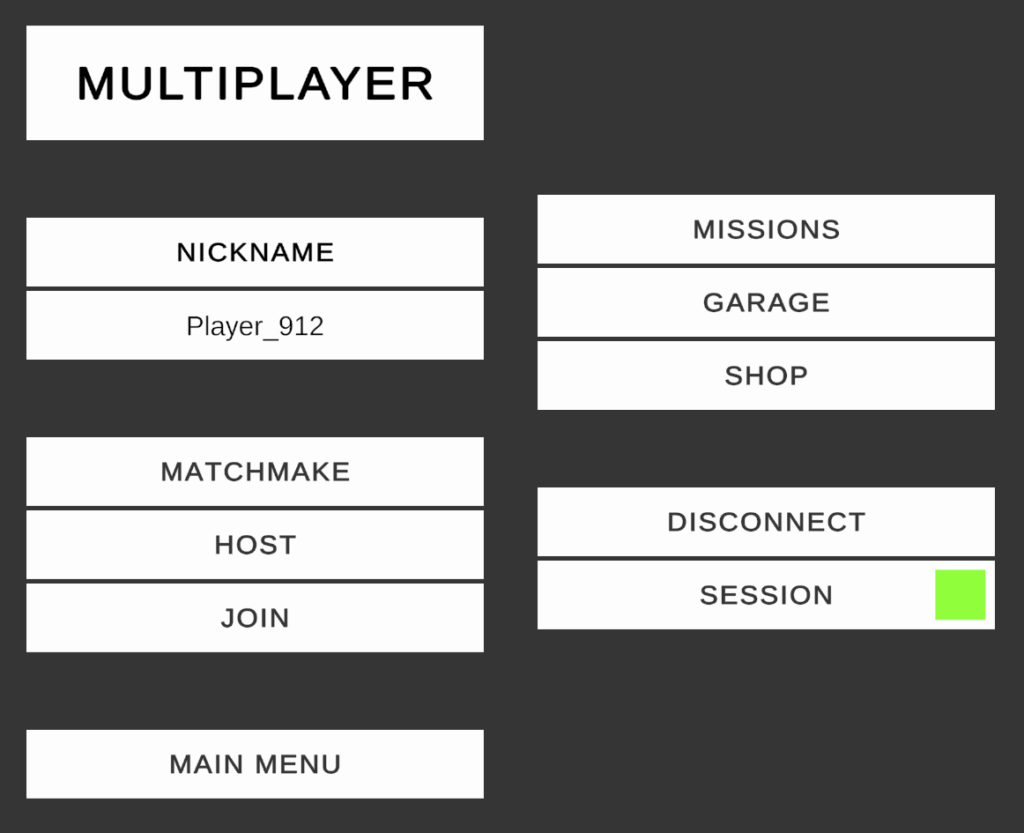
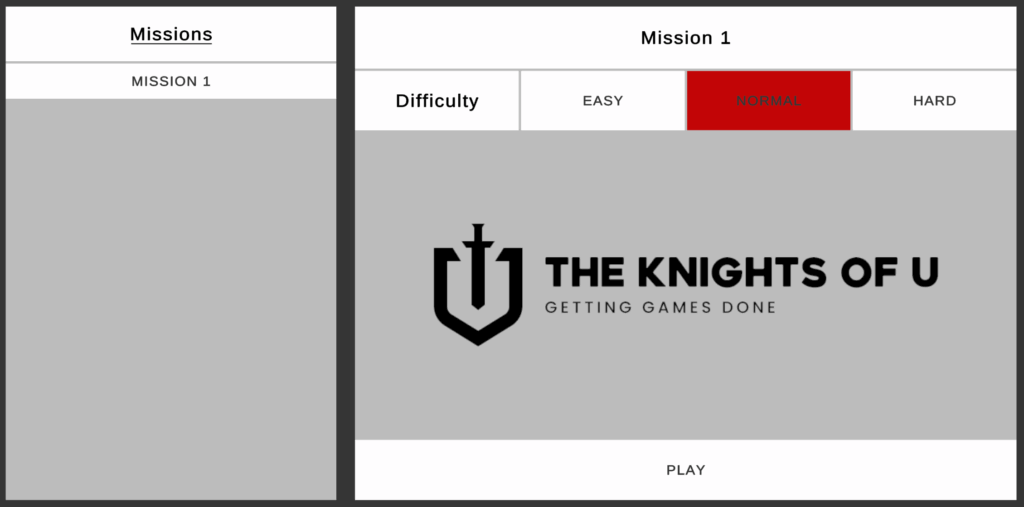
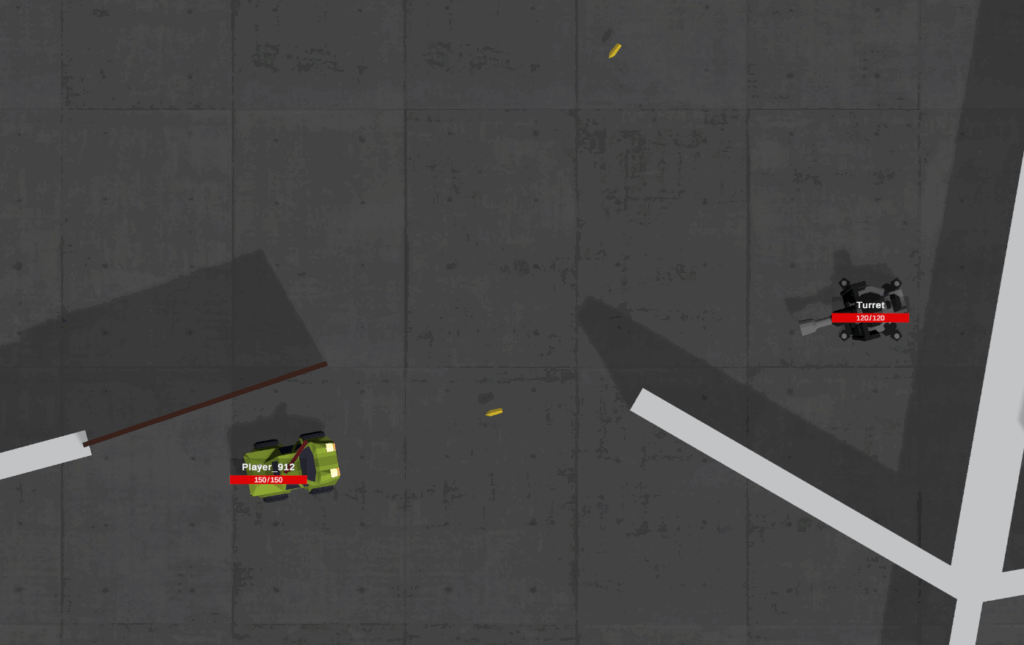
The game is a 3D top-down shooter where you work with up to 4 players in classic co-op mode. Each player drives a unique vehicle using the W, S, A, D keys and the mouse. At the start of each session, players choose from three predefined vehicles. Every vehicle has a weapon mounted on its roof – you aim and shoot using the mouse. Missions include red objects as required targets – you must destroy all of them to win. Yellow objects are optional – you can destroy them, but they aren’t needed to finish the mission. Automated turrets on the map shoot at player vehicles and deal damage.
Project Setup
Before you start with Photon Fusion 2, make sure you have everything set up. We explained all the details in the first article of this series, so if you need a refresher, click here.
Photon Dashboard
First, create a Photon Engine account. If you don’t have one yet, go to the Photon website and sign up.
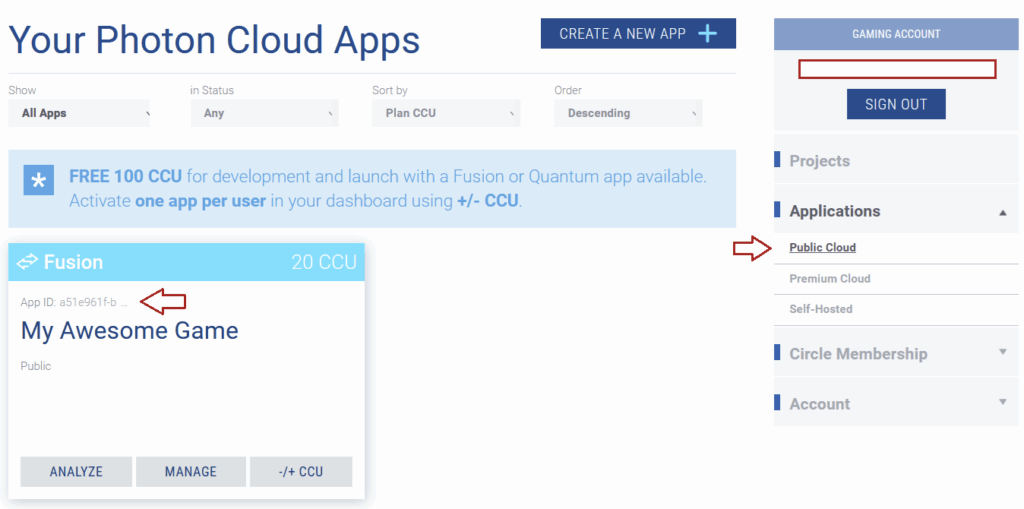
Next, open the Photon Dashboard and create a new Fusion 2 application. This will generate a dedicated App ID for your game. You can reuse the same App ID from previous articles if you want, but remember: network traffic from both projects will mix. This is fine for personal test projects.
Once you’ve set up your “My Awesome Game”, copy its App ID from the location shown in the image below. Now you’re ready to configure your Unity project.
Unity Project
At the time of writing this post, the latest Photon Fusion 2 SDK is 2.0.12 Stable Build 1861, released March 19, 2026. The minimum Unity version required for Photon Fusion 2 is 2021.3.45/2022.3.x/6.0.x or newer.
Create a new Unity project and import the Fusion 2 SDK. Download the latest Fusion 2 .unitypackage from this link, then import it using Assets > Import Package > Custom Package. After the import, you’ll see the Photon Fusion 2 Hub – your main management panel. If it doesn’t appear automatically, find it in the top menu under Tools > Fusion > Fusion Hub.
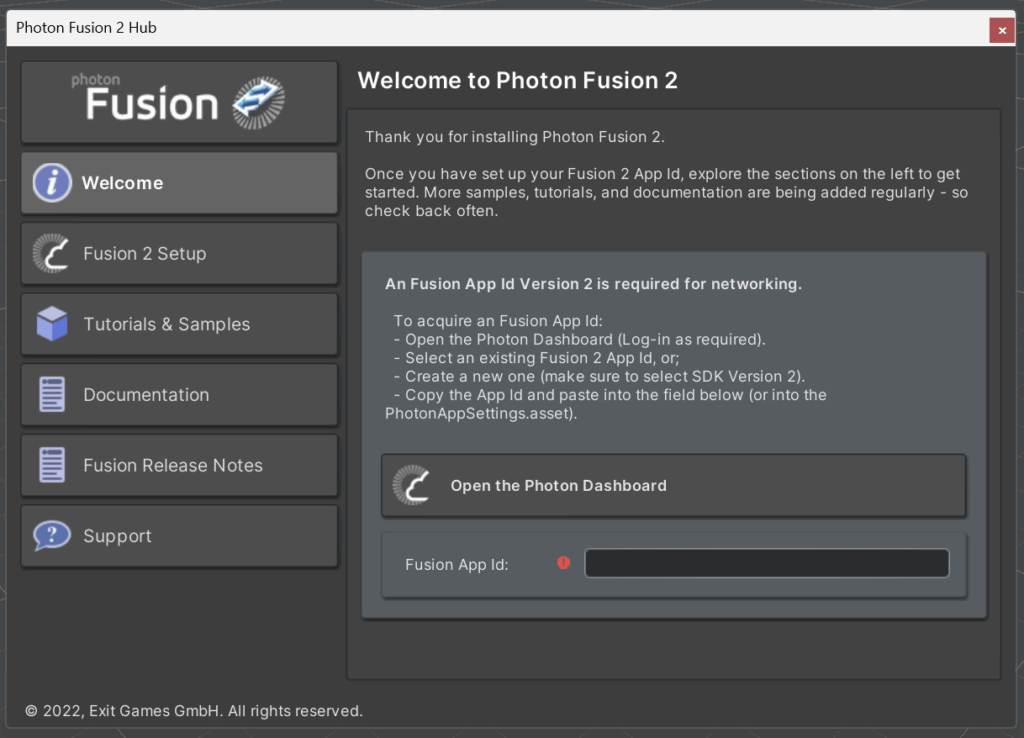
Paste the App ID you copied earlier from the Dashboard into the appropriate field. If the App ID is valid, the icon will turn green. Now your setup is complete – you’re ready to start building with Fusion 2!
Scene Management
In this section, you’ll create a SceneLoader class to manage scene transitions during the game. Your project uses three main scenes: Splash_Screen, Main_Menu, and Mission_x. You can add more mission scenes later if you want to expand the project, but for this tutorial, you’ll work with just one. Make sure to include every scene you plan to use in the Build Settings window.
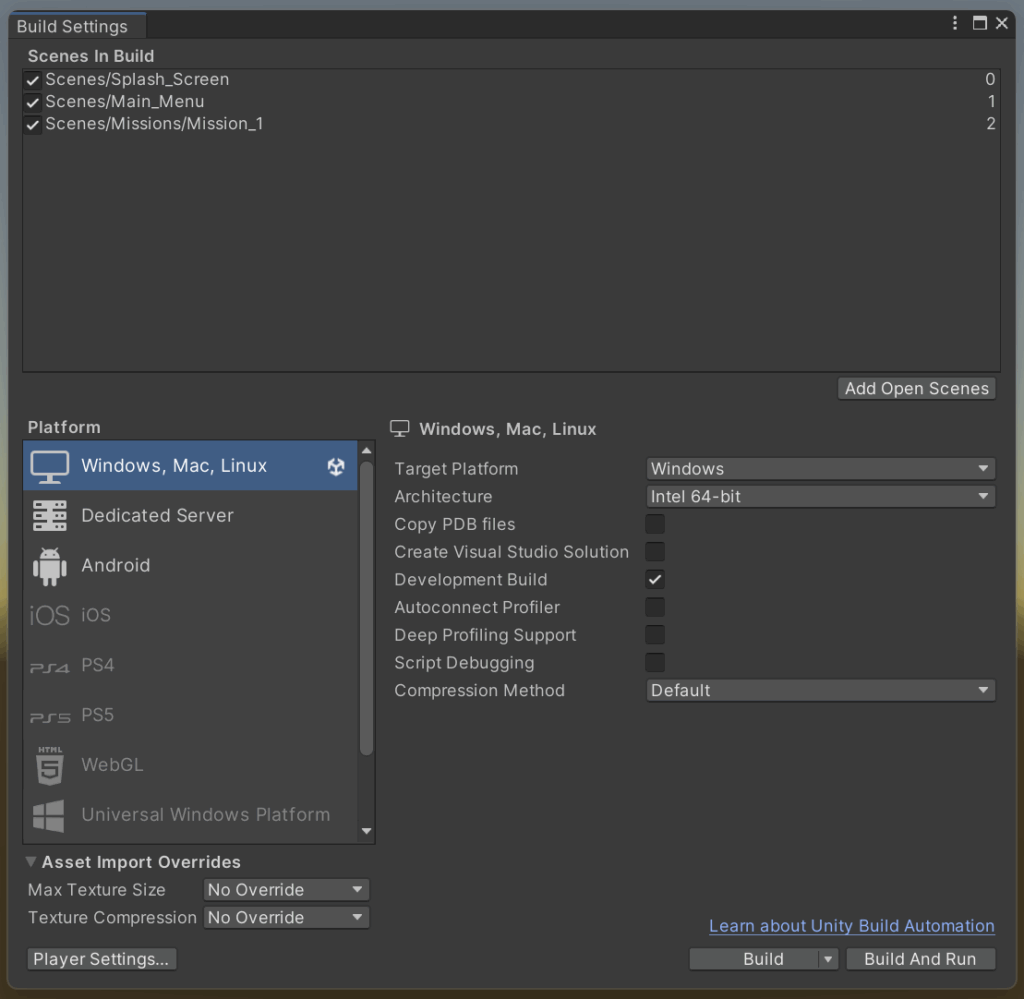
The Splash_Screen scene initialises core game systems. It loads only once when the app starts and creates singleton objects that remain active throughout the session. This scene has its own controller, which moves the game to Main_Menu automatically once all required systems are ready. On Splash_Screen, you’ll set up the Network Manager (explained in the next section), the Missions Manager (handles available mission info), and the SceneLoader itself. You’ll also initialise shared UI elements here, such as pop-up controllers and the loading screen shown when switching scenes.
The Main_Menu scene is where players choose the game mode – for example, Singleplayer or Multiplayer – and adjust settings. Here, players can host a game, join existing sessions, or configure the match before starting. The Host can launch the mission only after every player has picked a vehicle and set their status to Ready. At that point, the SceneLoader switches to the Mission_x scene.
The Mission_x scene is the specific mission chosen by the Host. In this scene, players control their vehicles and work together to complete mission objectives.
Below is the SceneLoader class, which extends the default NetworkSceneManagerDefault controller from Photon Fusion 2. This custom SceneLoader adds support for loading screens, lets you respond to scene loading progress, and gives you a place to add any extra logic your game needs.
In the code below, you’ll find a tutorial-only section that introduces a fake loading time. This part simulates large data loads and longer system initialisation; you can safely remove it from your own project.
This code assumes Splash_Screen and Main_Menu have scene indexes 0 and 1, and that mission scenes start from index 2. That’s why the LoadMission method uses GetMissionSceneIndex, which calculates the correct scene index for the chosen mission ID. In this tutorial, every scene loads in Single mode, but check the documentation for info on additive scene loading and how to write a custom scene controller using the Fusion 2 INetworkSceneManager interface.
SceneLoader.cs
Expand/Collapse Code
using Fusion;
using ProtoGDM.Networking;
using ProtoGDM.UI;
using System.Collections;
using UnityEngine;
using UnityEngine.SceneManagement;

namespace ProtoGDM.ScenesManagement
{
    public class SceneLoader : NetworkSceneManagerDefault
    {
        #region Variables

        public const int SPLASH_SCREEN_SCENE = 0;
        public const int MAIN_MENU_SCENE = 1;

        [SerializeField]
        private float minimumLoadingTime = 2f;

        #endregion Variables

        #region Public methods

        public void LoadScene(int index, bool noRunner = false)
        {
            if (!noRunner && Runner)
            {
                Runner.LoadScene(SceneRef.FromIndex(index));
            }
            else
            {
                StartCoroutine(LoadSceneAsync(index));
            }
        }

        public void LoadMission(Mission mission)
        {
            if (Runner)
            {
                Runner.LoadScene(SceneRef.FromIndex(GetMissionSceneIndex(mission.ID)), LoadSceneMode.Single);
            }
        }

        #endregion Public methods

        #region Private methods

        protected override IEnumerator LoadSceneCoroutine(SceneRef sceneRef, NetworkLoadSceneParameters sceneParams)
        {
            PreLoadScene(sceneRef.AsIndex);

            yield return base.LoadSceneCoroutine(sceneRef, sceneParams);

            // Delay one frame, so we're sure level objects has spawned locally
            yield return null;

            if (sceneRef.AsIndex > MAIN_MENU_SCENE)
            {
                if (Runner.IsServer && (Runner.GameMode == GameMode.Single || Runner.GameMode == GameMode.Host))
                {
                    if (Runner.CanSpawn)
                    {
                        foreach (RoomPlayer roomPlayer in RoomPlayer.RoomPlayers)
                        {
                            MissionController.Instance.SpawnPlayerVehicle(Runner, roomPlayer);
                        }
                    }
                }
            }

            PostLoadScene();
        }

        protected override void OnLoadSceneProgress(SceneRef sceneRef, float progress)
        {
            base.OnLoadSceneProgress(sceneRef, progress);

            // TODO: Loading Progress logic here.
        }

        protected override IEnumerator OnSceneLoaded(SceneRef sceneRef, Scene scene, NetworkLoadSceneParameters sceneParams)
        {
            // TODO: Scene Loaded logic here.

            yield return base.OnSceneLoaded(sceneRef, scene, sceneParams);
        }

        private void PreLoadScene(int index)
        {
            LoadingScreenUIManager.Instance.ShowLoadingScreen(1.5f);
        }

        private void PostLoadScene()
        {
            LoadingScreenUIManager.Instance.HideLoadingScreen();

            PopupsUIManager.Instance.HideLastPopup();
        }

        private int GetMissionSceneIndex(int missionIndex)
        {
            int offset = 2;

            return missionIndex + offset;
        }

        private IEnumerator LoadSceneAsync(int index)
        {
            PreLoadScene(index);

            float startTime = Time.time;

            AsyncOperation asyncOperation = SceneManager.LoadSceneAsync(index);

            asyncOperation.allowSceneActivation = false;

            while (asyncOperation.progress < 0.9f)
            {
                yield return null;
            }

            float elapsedTime = Time.time - startTime;

            //Simulated loading delay (minimumLoadingTime) to mimic the loading of larger data assets.
            if (elapsedTime < minimumLoadingTime)
            {
                yield return new WaitForSeconds(minimumLoadingTime - elapsedTime);
            }

            asyncOperation.allowSceneActivation = true;

            while (!asyncOperation.isDone)
            {
                yield return null;
            }

            PostLoadScene();
        }

        #endregion Private methods
    }
}
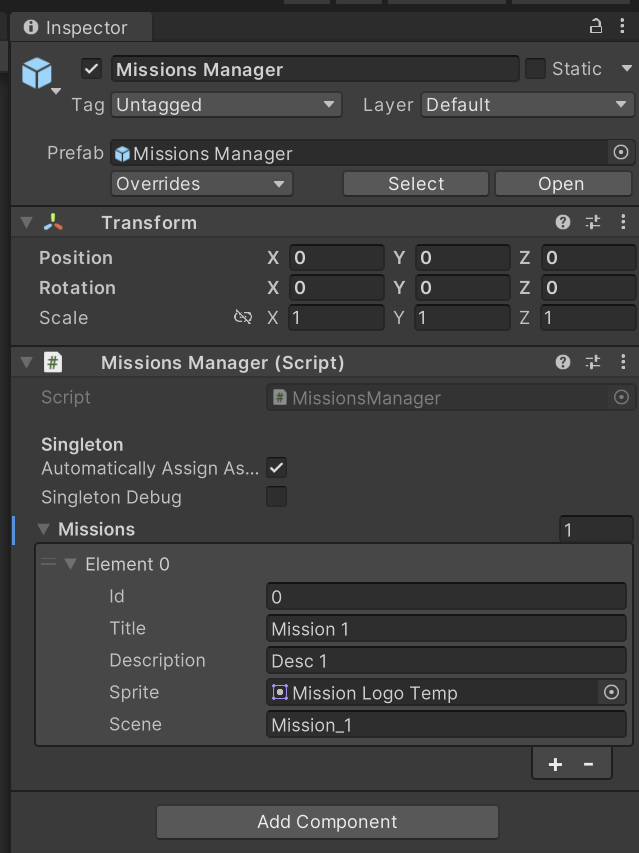
Below is the ready-to-use code for the MissionManager and Mission classes. Add a MissionManager component to an object in the Splash_Screen scene. Be sure to set up at least one mission. The first mission should have an ID of 0 and a valid scene name, such as Mission_1.
MissionsManager.cs
Expand/Collapse Code
using ProtoGDM.Utilities;
using System.Collections.Generic;
using UnityEngine;

namespace ProtoGDM
{
    public class MissionsManager : Singleton<MissionsManager>
    {
        #region Properties

        [SerializeField]
        private List<Mission> missions;

        #endregion

        #region Unity methods

        protected override void Awake()
        {
            base.Awake();

            DontDestroyOnLoad(gameObject);
        }

        #endregion Unity methods

        #region Public methods

        public Mission GetMission(int id)
        {
            Mission mission = null;

            foreach (var item in missions)
            {
                if (item.ID == id)
                {
                    mission = item;

                    break;
                }
            }

            return mission;
        }

        public List<Mission> GetMissions()
        {
            if (missions != null)
            {
                return new List<Mission>(missions);
            }
            else
            {
                return new List<Mission>();
            }
        }

        #endregion Public methods
    }
}
Mission.cs
Expand/Collapse Code
using System;
using UnityEngine;

namespace ProtoGDM
{
    [Serializable]
    public class Mission
    {
        #region Properties

        [SerializeField]
        private int id;

        public int ID
        {
            get
            {
                return id;
            }
        }

        [SerializeField]
        private string title;

        public string Title
        {
            get
            {
                return title;
            }
        }

        [SerializeField]
        private string description;

        public string Description
        {
            get
            {
                return description;
            }
        }

        [SerializeField]
        private Sprite sprite;

        public Sprite Sprite
        {
            get
            {
                return sprite;
            }
        }

        [SerializeField]
        private string scene;

        public string Scene
        {
            get
            {
                return scene;
            }
        }

        #endregion
    }
}
Here’s an example of a correct test mission definition in the Splash_Screen scene.
Network Management
You need to implement the NetworkManager class to manage player sessions and handle network events. NetworkManager implements the INetworkRunnerCallbacks interface, which gives you callbacks for events such as player connections and disconnections, gathering player input, session data updates, data transmission, and host migration. The class lets you start sessions for a single player or host and join multiplayer games as a Host or Client. It also includes a basic matchmaking mechanic.
We already covered session management in detail in a previous article of this series. If you need a refresher or want more details, check out the article Photon Fusion 2 – Sessions Management. In this article, we’ll focus on the basic methods for creating and joining sessions. The next section will cover the mechanics of reconnect.
NetworkManager is a singleton placed in the Splash_Screen scene. The application creates it at startup and manages all sessions throughout the app’s lifetime. You need to assign four key references in the Inspector.
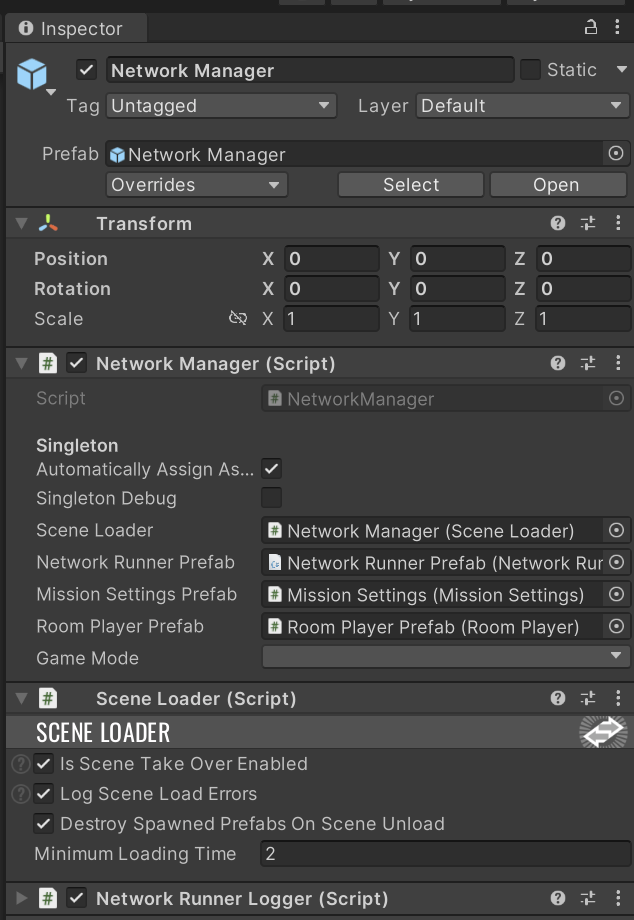
Reference to sceneLoader – the controller from the previous chapter, responsible for scene loading.
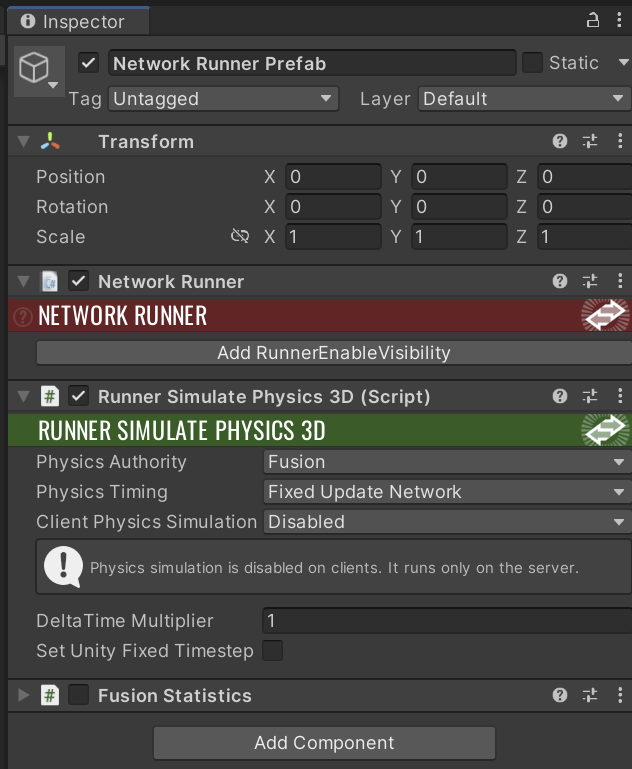
Prefab networkRunnerPrefab – the core Photon Fusion 2 prefab for network communication. Since this demo includes physics, your prefab should have both NetworkRunner and RunnerSimulatePhysics3D components.
Prefab missionSettingsPrefab – synchronises mission data selected by the Host.
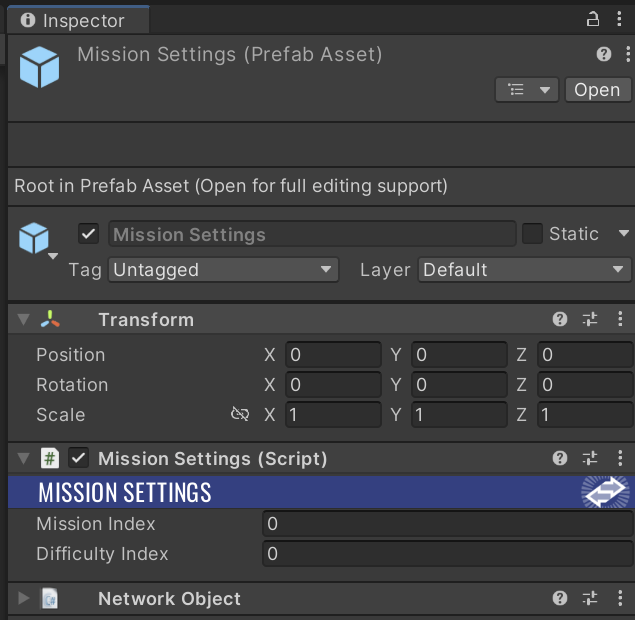
MissionSettings.cs
Expand/Collapse Code
using Fusion;
using System;

namespace ProtoGDM.Networking
{
    public class MissionSettings : NetworkBehaviour
    {
        #region Events

        public static event Action<MissionSettings> OnMissionSettingsUpdated;

        #endregion Events

        #region Variables

        private ChangeDetector changeDetector;

        #endregion Variables

        #region Properties

        public static MissionSettings Instance
        {
            get;
            private set;
        }

        [Networked]
        public int MissionIndex
        {
            get;
            set;
        }

        [Networked]
        public int DifficultyIndex
        {
            get;
            set;
        }

        #endregion Properties

        #region Unity methods

        private void Awake()
        {
            if (Instance)
            {
                Destroy(gameObject);

                return;
            }

            Instance = this;

            DontDestroyOnLoad(gameObject);
        }

        #endregion Unity methods

        #region Public methods

        public override void Spawned()
        {
            changeDetector = GetChangeDetector(ChangeDetector.Source.SimulationState);

            if (Object.HasStateAuthority)
            {
                MissionIndex = 0;

                DifficultyIndex = 1;
            }
        }

        public float GetDifficultyFactor()
        {
            switch (DifficultyIndex)
            {
                case 0:
                    return 0.5f;
                case 1:
                    return 1f;
                case 2:
                    return 1.5f;
                default:
                    return 1f;
            }
        }

        public override void Render()
        {
            foreach (var change in changeDetector.DetectChanges(this))
            {
                switch (change)
                {
                    case nameof(MissionIndex):
                    case nameof(DifficultyIndex):
                        OnMissionSettingsChangedCallback(this);
                        break;
                }
            }
        }

        #endregion Public methods

        #region Private methods

        private void OnMissionSettingsChangedCallback(MissionSettings gameManager)
        {
            OnMissionSettingsUpdated?.Invoke(gameManager);
        }

        #endregion Private methods
    }
}
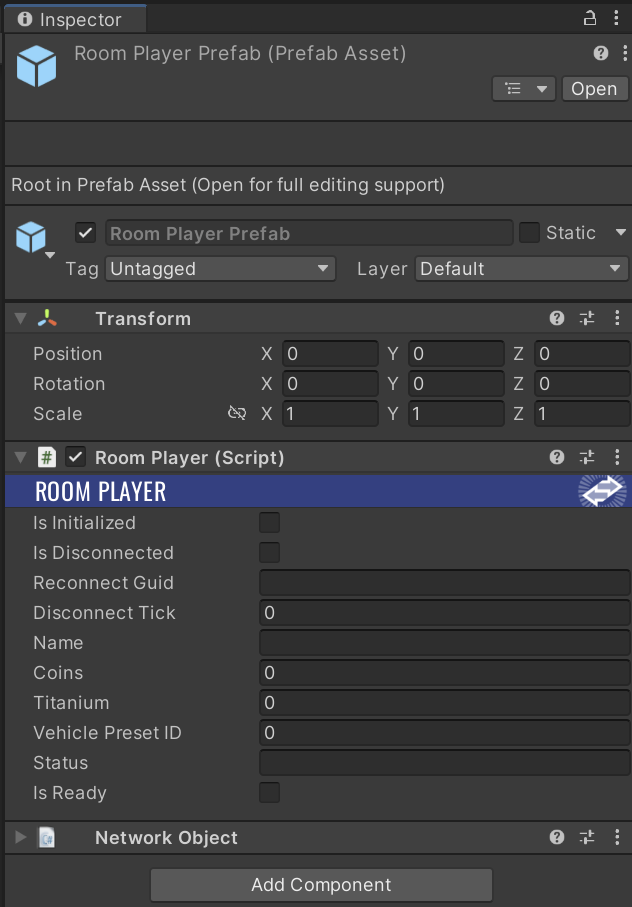
Prefab roomPlayerPrefab – represents each player in a session, synchronises player data, and supports the reconnect mechanic. You’ll learn more about RoomPlayer in later chapters.
This tutorial uses a Host-Client topology. One of the Clients acts as the Server and has authority over all other players. Players can create their own sessions, set a custom name, choose the number of players (2, 3, or 4), and protect the session with a password if needed.
Below you’ll find the full code for the NetworkManager class. The code is long, but understanding each method will help you write and modify your own multiplayer logic. In this example, you won’t see every callback from the INetworkRunnerCallbacks interface. The unused callbacks are grouped in a separate region.
NetworkManager.cs
Expand/Collapse Code
using Fusion;
using Fusion.Photon.Realtime;
using Fusion.Sockets;
using ProtoGDM.ScenesManagement;
using ProtoGDM.Utilities;
using System;
using System.Collections.Generic;
using System.Threading.Tasks;
using UnityEngine;
using UnityEngine.SceneManagement;
namespace ProtoGDM.Networking
{
public class NetworkManager : Singleton<NetworkManager>, INetworkRunnerCallbacks
{
#region Events
public event Action<List<SessionInfo>> OnNetworkRunnerSessionListUpdated;
public event Action<ShutdownReason> OnNetworkRunnerShutdown;
#endregion Events
#region Consts
public const string SESSION_NAME_KEY = "sessionName";
public const string SESSION_PASSWORD_REQUIRED_KEY = "sessionPasswordRequired";
#endregion Consts
#region Variables
[SerializeField]
private SceneLoader sceneLoader;
[SerializeField]
private NetworkRunner networkRunnerPrefab;
[SerializeField]
private MissionSettings missionSettingsPrefab;
[SerializeField]
private RoomPlayer roomPlayerPrefab;
private MissionSettings missionSettings;
private bool currentSessionPasswordRequired;
private string currentSessionPassword;
private Dictionary<string, RoomPlayer> roomPlayerMap;
#endregion Variables
#region Properties
private NetworkRunner networkRunner;
public NetworkRunner NetworkRunner
{
get
{
return networkRunner;
}
private set
{
networkRunner = value;
}
}
[SerializeField]
private GameMode gameMode;
public GameMode GameMode
{
get
{
return gameMode;
}
private set
{
gameMode = value;
}
}
#endregion
#region Unity methods
protected override void Awake()
{
base.Awake();
roomPlayerMap = new Dictionary<string, RoomPlayer>();
DontDestroyOnLoad(gameObject);
}
private void Start()
{
//RoomPlayer.RemovePlayerData();
if (!RoomPlayer.LoadPlayerData())
{
RoomPlayer.CreatePlayerData("Player_" + UnityEngine.Random.Range(0, 1000), null);
}
}
#endregion Unity methods
#region Public methods
#region INetworkRunnerCallbacks
public void OnSessionListUpdated(NetworkRunner networkRunner, List<SessionInfo> sessionList)
{
OnNetworkRunnerSessionListUpdated?.Invoke(sessionList);
}
public void OnConnectRequest(NetworkRunner networkRunner, NetworkRunnerCallbackArgs.ConnectRequest request, byte[] token)
{
string password = string.Empty;
if (token != null)
{
ConnectionToken connectionToken = ConnectionToken.FromBytes(token);
if (connectionToken != null)
{
password = connectionToken.password;
string reconnectGuid = connectionToken.reconnectGuid;
if (roomPlayerMap.ContainsKey(reconnectGuid))
{
RoomPlayer roomPlayer = roomPlayerMap[reconnectGuid];
if (roomPlayer == null)
{
roomPlayerMap.Remove(reconnectGuid);
request.Refuse();
return;
}
}
}
}
if (currentSessionPasswordRequired)
{
if (currentSessionPassword.Equals(password))
{
request.Accept();
}
else
{
request.Refuse();
}
}
else
{
request.Accept();
}
}
public void OnPlayerJoined(NetworkRunner networkRunner, PlayerRef player)
{
if (networkRunner.CanSpawn)
{
byte[] playerConnectionToken = networkRunner.GetPlayerConnectionToken(player);
ConnectionToken connectionToken = ConnectionToken.FromBytes(playerConnectionToken);
string reconnectGuid = string.Empty;
if (connectionToken != null)
{
reconnectGuid = connectionToken.reconnectGuid;
}
if (!missionSettings)
{
missionSettings = networkRunner.Spawn(missionSettingsPrefab, Vector3.zero, Quaternion.identity);
}
RoomPlayer roomPlayer = null;
if (roomPlayerMap.TryGetValue(reconnectGuid, out roomPlayer) == false || roomPlayer == null)
{
roomPlayer = networkRunner.Spawn(roomPlayerPrefab, Vector3.zero, Quaternion.identity, player, (networkRunner, networkObject) =>
{
networkObject.GetBehaviour<RoomPlayer>().ReconnectGuid = reconnectGuid;
});
}
if (connectionToken != null)
{
roomPlayerMap[reconnectGuid] = roomPlayer;
}
roomPlayer.AssignInputAuthority(player);
roomPlayer.IsDisconnected = false;
roomPlayer.DisconnectTick = 0;
networkRunner.SetPlayerObject(player, roomPlayer.Object);
}
}
public void OnPlayerLeft(NetworkRunner networkRunner, PlayerRef player)
{
RoomPlayer roomPlayer = RoomPlayer.GetPlayer(player);
if (roomPlayer != null)
{
roomPlayer.IsDisconnected = true;
roomPlayer.DisconnectTick = networkRunner.Tick;
}
}
public void OnInput(NetworkRunner networkRunner, NetworkInput networkInput)
{
NetworkInputData networkedInputData = new NetworkInputData();
networkedInputData.acceleration = PlayerInput.GetAxis("Vertical");
networkedInputData.braking = PlayerInput.GetKey(KeyCode.Space) ? 1f : 0f;
networkedInputData.steering = PlayerInput.GetAxis("Horizontal");
networkedInputData.shooting = PlayerInput.GetMouseButton(0);
networkedInputData.networkButtons.Set(NetworkInputData.ButtonTypes.Reload, PlayerInput.GetKey(KeyCode.R));
networkedInputData.networkButtons.Set(NetworkInputData.ButtonTypes.Reset, PlayerInput.GetKey(KeyCode.P));
Ray ray = Camera.main.ScreenPointToRay(PlayerInput.MousePosition);
Plane groundPlane = new Plane(Vector3.up, 0.5f * Vector3.up);
if (groundPlane.Raycast(ray, out float rayDistance))
{
Vector3 targetPoint = ray.GetPoint(rayDistance);
networkedInputData.targetPoint = targetPoint;
}
networkInput.Set(networkedInputData);
}
public void OnShutdown(NetworkRunner networkRunner, ShutdownReason shutdownReason)
{
if (SceneManager.GetActiveScene().buildIndex > SceneLoader.MAIN_MENU_SCENE)
{
sceneLoader.LoadScene(SceneLoader.MAIN_MENU_SCENE, true);
}
OnNetworkRunnerShutdown?.Invoke(shutdownReason);
}
public void OnDisconnectedFromServer(NetworkRunner networkRunner, NetDisconnectReason reason)
{
ShutdownSession();
}
#region NOT USED
public void OnConnectedToServer(NetworkRunner networkRunner) { }
public void OnObjectExitAOI(NetworkRunner networkRunner, NetworkObject obj, PlayerRef player) { }
public void OnObjectEnterAOI(NetworkRunner networkRunner, NetworkObject obj, PlayerRef player) { }
public void OnInputMissing(NetworkRunner networkRunner, PlayerRef player, NetworkInput input) { }
public void OnConnectFailed(NetworkRunner networkRunner, NetAddress remoteAddress, NetConnectFailedReason reason) { }
public void OnUserSimulationMessage(NetworkRunner networkRunner, SimulationMessagePtr message) { }
public void OnCustomAuthenticationResponse(NetworkRunner runner, Dictionary<string, object> data) { }
public void OnHostMigration(NetworkRunner networkRunner, HostMigrationToken hostMigrationToken) { }
public void OnReliableDataProgress(NetworkRunner networkRunner, PlayerRef player, ReliableKey reliableKey, float progress) { }
public void OnReliableDataReceived(NetworkRunner networkRunner, PlayerRef player, ReliableKey reliableKey, ArraySegment<byte> data) { }
public void OnSceneLoadStart(NetworkRunner networkRunner) { }
public void OnSceneLoadDone(NetworkRunner networkRunner) { }
#endregion NOT USED
#endregion INetworkRunnerCallbacks
public async Task StartSingle(string sessionName, Action onSuccess, Action<string> onFailure)
{
GameMode = GameMode.Single;
if (NetworkRunner == null)
{
CreateNetworkRunner();
}
currentSessionPasswordRequired = false;
currentSessionPassword = null;
Dictionary<string, SessionProperty> sessionProperties = new Dictionary<string, SessionProperty>
{
{ SESSION_NAME_KEY, sessionName },
{ SESSION_PASSWORD_REQUIRED_KEY, currentSessionPasswordRequired },
};
ConnectionToken connectionToken = new ConnectionToken(null, SessionID.GuidString);
StartGameArgs startGameArgs = new StartGameArgs()
{
GameMode = GameMode,
PlayerCount = 1,
SessionProperties = sessionProperties,
SceneManager = sceneLoader,
ConnectionToken = ConnectionToken.ToBytes(connectionToken)
};
StartGameResult result = await NetworkRunner.StartGame(startGameArgs);
if (result.Ok)
{
Debug.Log($"StartSingle Mode {NetworkRunner.Mode} {NetworkRunner.IsServer} {NetworkRunner.IsClient}");
onSuccess?.Invoke();
}
else
{
Debug.LogError($"StartHost Failure {result.ShutdownReason}");
currentSessionPassword = string.Empty;
onFailure?.Invoke(result.ShutdownReason.ToString());
}
}
public async Task StartHost(string sessionName, string password, int maxPlayers, Action onSuccess, Action<string> onFailure)
{
GameMode = GameMode.Host;
if (NetworkRunner == null)
{
CreateNetworkRunner();
}
currentSessionPasswordRequired = !string.IsNullOrEmpty(password);
currentSessionPassword = password;
Dictionary<string, SessionProperty> sessionProperties = new Dictionary<string, SessionProperty>
{
{ SESSION_NAME_KEY, sessionName },
{ SESSION_PASSWORD_REQUIRED_KEY, currentSessionPasswordRequired },
};
var sceneRef = SceneRef.FromIndex(SceneManager.GetActiveScene().buildIndex);
NetworkSceneInfo info = new NetworkSceneInfo();
info.AddSceneRef(sceneRef, LoadSceneMode.Single);
ConnectionToken connectionToken = new ConnectionToken(password, SessionID.GuidString);
StartGameArgs startGameArgs = new StartGameArgs()
{
Scene = info,
GameMode = GameMode,
SessionName = sessionName,
PlayerCount = maxPlayers,
SessionProperties = sessionProperties,
SceneManager = sceneLoader
};
StartGameResult result = await NetworkRunner.StartGame(startGameArgs);
if (result.Ok)
{
Debug.Log($"StartHost Mode {NetworkRunner.Mode} {NetworkRunner.IsServer} {NetworkRunner.IsClient}");
onSuccess?.Invoke();
}
else
{
Debug.LogError($"StartHost Failure {result.ShutdownReason}");
currentSessionPassword = string.Empty;
onFailure?.Invoke(result.ShutdownReason.ToString());
}
}
public async Task JoinLobby(Action onSuccess, Action<string> onFailure)
{
if (NetworkRunner == null)
{
CreateNetworkRunner();
}
StartGameResult result = await NetworkRunner.JoinSessionLobby(SessionLobby.ClientServer);
if (result.Ok)
{
// all ok
onSuccess?.Invoke();
}
else
{
// log error
Debug.LogError($"JoinLobby failure {result.ShutdownReason}");
onFailure?.Invoke(result.ShutdownReason.ToString());
}
}
public async Task JoinSession(string sessionName, string password, Action onSuccess, Action<string> onFailure)
{
GameMode = GameMode.Client;
if (NetworkRunner == null)
{
CreateNetworkRunner();
}
var sceneRef = SceneRef.FromIndex(SceneManager.GetActiveScene().buildIndex);
NetworkSceneInfo info = new NetworkSceneInfo();
info.AddSceneRef(sceneRef, LoadSceneMode.Single);
ConnectionToken connectionToken = new ConnectionToken(password, SessionID.GuidString);
StartGameArgs startGameArgs = new StartGameArgs
{
Scene = info,
GameMode = GameMode,
SessionName = sessionName,
SceneManager = sceneLoader,
ConnectionToken = ConnectionToken.ToBytes(connectionToken)
};
StartGameResult result = await NetworkRunner.StartGame(startGameArgs);
if (result.Ok)
{
Debug.Log($"JoinSession Mode {NetworkRunner.Mode} {NetworkRunner.IsServer} {NetworkRunner.IsClient}");
PlayerPrefs.SetString("CURRENT_SESSION_NAME", sessionName);
PlayerPrefs.SetString("CURRENT_CONNECTION_TOKEN", Convert.ToBase64String(ConnectionToken.ToBytes(connectionToken)));
PlayerPrefs.Save();
onSuccess?.Invoke();
}
else
{
Debug.LogError($"JoinSession Failure {result.ShutdownReason}");
onFailure?.Invoke(result.ShutdownReason.ToString());
}
}
public async Task StartMatchmake(string sessionName, int maxPlayers, Action onSuccess, Action<string> onFailure)
{
GameMode = GameMode.AutoHostOrClient;
if (NetworkRunner == null)
{
CreateNetworkRunner();
}
currentSessionPasswordRequired = false;
currentSessionPassword = string.Empty;
Dictionary<string, SessionProperty> sessionProperties = new Dictionary<string, SessionProperty>
{
{ SESSION_NAME_KEY, sessionName },
{ SESSION_PASSWORD_REQUIRED_KEY, currentSessionPasswordRequired },
};
ConnectionToken connectionToken = new ConnectionToken(string.Empty, SessionID.GuidString);
StartGameArgs startGameArgs = new StartGameArgs
{
GameMode = GameMode,
PlayerCount = maxPlayers,
SessionProperties = sessionProperties,
SceneManager = sceneLoader,
MatchmakingMode = MatchmakingMode.RandomMatching,
ConnectionToken = ConnectionToken.ToBytes(connectionToken)
};
StartGameResult result = await NetworkRunner.StartGame(startGameArgs);
if (result.Ok)
{
Debug.Log($"JoinSessionMatchmake Mode {NetworkRunner.Mode} {NetworkRunner.IsServer} {NetworkRunner.IsClient}");
onSuccess?.Invoke();
}
else
{
Debug.LogError($"JoinSessionMatchmake Failure {result.ShutdownReason}");
onFailure?.Invoke(result.ShutdownReason.ToString());
}
}
public void ShowSession()
{
if (!NetworkRunner.IsServer)
{
return;
}
NetworkRunner.SessionInfo.IsVisible = true;
}
public void HideSession()
{
if (!NetworkRunner.IsServer)
{
return;
}
NetworkRunner.SessionInfo.IsVisible = false;
}
public void ShutdownSession()
{
if (NetworkRunner != null)
{
NetworkRunner.Shutdown();
}
GameMode = 0;
}
#endregion Public methods
#region Private methods
private void CreateNetworkRunner()
{
NetworkRunner = Instantiate(networkRunnerPrefab);
NetworkRunner.AddCallbacks(this);
}
#endregion Private methods
}
}
Singleton.cs
Expand/Collapse Code
using UnityEngine;

namespace ProtoGDM.Utilities
{
    public abstract class Singleton<T> : MonoBehaviour where T : Singleton<T>
    {
        [Header("Singleton")]

        [SerializeField]
        [Tooltip("Automatically sets this script as the instance")]
        private bool automaticallyAssignAsInstance = true;

        [SerializeField]
        [Tooltip("Debug this singleton")]
        private bool singletonDebug = false;

        private static T instance;

        public static T Instance
        {
            get
            {
                if (instance == null)
                {
                    Debug.LogError($"Inst doesn't exist!");
                    return null;
                }

                if (instance.singletonDebug)
                {
                    Debug.Log($"Retreiving singleton.");
                }

                return instance;
            }

            set
            {
                if (instance != null && instance.singletonDebug)
                {
                    Debug.Log($"Changing singleton instance to {instance?.GetInstanceID()}");
                }

                instance = value;

                if (instance != null && instance.singletonDebug)
                {
                    Debug.Log($"Changed singleton instance");
                }
            }
        }

        public static bool InstExists => (instance != null);

        protected virtual void Awake()
        {
            if (automaticallyAssignAsInstance)
            {
                Instance = (T)this;
            }
        }

        protected virtual void OnDestroy()
        {
            Instance = null;
        }
    }
}
NetworkManager works as a singleton. This approach makes implementation easier, but be mindful not to overuse global access. If you prefer, you can use explicit references instead of the singleton pattern.
The class exposes a NetworkRunner property. The whole application uses just one NetworkRunner to manage network communication, so NetworkManager serves as a central reference point for this component.
NetworkManager offers several key public methods:
StartSingle – Starts a single-player session. You still get all Fusion 2 features, but without any internet connection. This is great for small projects that share logic between single and multiplayer modes.
StartHost – Creates a new session as the Host. You set the session name, player limit, and password protection if needed. You join as the first player and act as the Host.
JoinLobby – Joins a Fusion 2 Lobby. A Lobby is tied to a specific region and lists all active sessions in that region.
JoinSession – Lets you join a session by name and password (if required). You join as a Client in the selected session.
ShowSession and HideSession – These methods control session visibility in the region’s Lobby. Use them as the Host to hide the session during gameplay or show it when waiting for players for the next round.
ShutdownSession – Shuts down the NetworkRunner and closes the network connection.
Network Objects
In this section, you’ll learn about the core networked objects that enable multiplayer gameplay. First, you’ll see how the RoomPlayer object represents each player who joins a session and gets ready for the game. Every player has a unique RoomPlayer instance that keeps their data synchronised across all peers.
After that, you’ll explore the main objects present in the gameplay scene. The MissionController class handles spawning player vehicles at the start of a mission and manages mission objectives and rewards. You’ll also discover how destructible elements work, starting with the base DestructibleObject class, followed by TurretWeaponController, VehicleController, and PlayerVehicleController.
Room Player
When a player joins a session as a Client, the Host triggers the OnConnectRequest callback. The Host decides in this method whether to let the player join the session. You’ll learn more about this method when we discuss reconnecting players later in the tutorial. If the Host accepts the join request, Fusion 2 assigns the player to the session and then calls the OnPlayerJoined callback. In this callback, the Host spawns a RoomPlayer object for the new player and gives them InputAuthority.
RoomPlayer stores and synchronises key player data, including the player’s name, current status (showing their current location), resources such as Coins and Titanium, the selected vehicle (VehiclePresetID), and the player’s ready status (IsReady).
You can also use RoomPlayer to save and load player data. In this demo, the system uses PlayerPrefs to store data locally. For real-world projects, you should replace this approach with a cloud-based service that securely saves data and protects against cheating.
RoomPlayer.cs
Expand/Collapse Code
using Fusion;
using MemoryPack;
using ProtoGDM.Data;
using ProtoGDM.Data.Presets;
using System;
using System.Collections.Generic;
using System.Linq;
using UnityEngine;

namespace ProtoGDM.Networking
{
    public class RoomPlayer : NetworkBehaviour
    {
        #region Events

        public static event Action<RoomPlayer> OnPlayerJoined;
        public static event Action<RoomPlayer> OnPlayerLeft;

        #endregion Events

        #region Variables

        private const string PLAYER_DATA_KEY = "playerData";

        public static readonly List<RoomPlayer> RoomPlayers = new List<RoomPlayer>();

        public static RoomPlayer LocalRoomPlayer;

        public static PlayerData LocalPlayerData;

        public PlayerVehicleController PlayerVehicleController
        {
            get;
            set;
        }

        private ChangeDetector changeDetector;

        #endregion Variables

        #region Properties

        [Networked]
        public NetworkBool IsInitialized
        {
            get;
            set;
        }

        [Networked]
        public NetworkBool IsDisconnected
        {
            get;
            set;
        }

        [Networked]
        public NetworkString<_64> ReconnectGuid
        {
            get;
            set;
        }

        [Networked]
        public float DisconnectTick
        {
            get;
            set;
        }

        [Networked]
        public NetworkString<_32> Name
        {
            get;
            set;
        }

        [Networked]
        public int Coins
        {
            get;
            set;
        }

        [Networked]
        public int Titanium
        {
            get;
            set;
        }

        [Networked]
        public int VehiclePresetID
        {
            get;
            set;
        }

        [Networked]
        public NetworkString<_32> Status
        {
            get;
            set;
        }

        [Networked]
        public NetworkBool IsReady
        {
            get;
            set;
        }

        #endregion Properties

        #region Unity methods

        private void OnDestroy()
        {
            OnPlayerLeft?.Invoke(this);

            RoomPlayers.Remove(this);
        }

        public override void FixedUpdateNetwork()
        {
            if (IsDisconnected && Runner.IsServer)
            {
                float secondsDisconnected = (Runner.Tick - DisconnectTick) * Runner.DeltaTime;

                if (secondsDisconnected > 30f)
                {
                    if (PlayerVehicleController)
                    {
                        Runner.Despawn(PlayerVehicleController.Object);
                    }

                    Runner.Despawn(Object);
                }
            }
        }

        #endregion Unity methods

        #region Public methods

        #region RPC

        [Rpc(RpcSources.InputAuthority, RpcTargets.StateAuthority, HostMode = RpcHostMode.SourceIsHostPlayer)]
        public void RPC_ChangeIsInitialized(NetworkBool isInitialized, RpcInfo info = default)
        {
            IsInitialized = isInitialized;
        }

        [Rpc(RpcSources.InputAuthority, RpcTargets.StateAuthority)]
        public void RPC_SetPlayerName(NetworkString<_32> name, RpcInfo info = default)
        {
            Name = name;
        }

        [Rpc(RpcSources.InputAuthority, RpcTargets.StateAuthority)]
        public void RPC_SetPlayerStatus(NetworkString<_32> status, RpcInfo info = default)
        {
            Status = status;
        }

        [Rpc(RpcSources.InputAuthority, RpcTargets.StateAuthority)]
        public void RPC_ChangeCoins(int coins, RpcInfo info = default)
        {
            Coins = coins;
        }

        [Rpc(RpcSources.InputAuthority, RpcTargets.StateAuthority)]
        public void RPC_ChangeTitanium(int titanium, RpcInfo info = default)
        {
            Titanium = titanium;
        }

        [Rpc(RpcSources.InputAuthority, RpcTargets.StateAuthority)]
        public void RPC_ChangeVehiclePresetID(int vehiclePresetID, RpcInfo info = default)
        {
            VehiclePresetID = vehiclePresetID;
        }

        [Rpc(RpcSources.InputAuthority, RpcTargets.StateAuthority, HostMode = RpcHostMode.SourceIsHostPlayer)]
        public void RPC_ChangeIsReady(NetworkBool isReady, RpcInfo info = default)
        {
            IsReady = isReady;
        }

        #endregion RPC

        public override void Spawned()
        {
            changeDetector = GetChangeDetector(ChangeDetector.Source.SimulationState);

            if (Object.HasInputAuthority)
            {
                LocalRoomPlayer = this;

                if (!IsInitialized && LocalPlayerData != null)
                {
                    LocalRoomPlayer.RPC_SetPlayerName(LocalPlayerData.name);
                    LocalRoomPlayer.RPC_SetPlayerStatus("Lobby");
                    LocalRoomPlayer.RPC_ChangeCoins(LocalPlayerData.coins);
                    LocalRoomPlayer.RPC_ChangeTitanium(LocalPlayerData.titanium);

                    if (LocalPlayerData.vehicle != null)
                    {
                        LocalRoomPlayer.RPC_ChangeVehiclePresetID(LocalPlayerData.vehicle.presetId);

                        if (Runner.GameMode == GameMode.Single)
                        {
                            LocalRoomPlayer.RPC_ChangeIsReady(true);
                        }
                    }
                    else
                    {
                        LocalRoomPlayer.RPC_ChangeVehiclePresetID(-1);
                        LocalRoomPlayer.RPC_ChangeIsReady(false);
                    }

                    LocalRoomPlayer.RPC_ChangeIsInitialized(true);
                }
            }

            RoomPlayers.Add(this);

            OnPlayerJoined?.Invoke(this);

            DontDestroyOnLoad(gameObject);
        }

        public override void Render()
        {
            foreach (var change in changeDetector.DetectChanges(this))
            {
                switch (change)
                {
                    case nameof(Name):
                    case nameof(Coins):
                    case nameof(Titanium):
                    case nameof(VehiclePresetID):
                    case nameof(IsReady):

                        if (Object.HasInputAuthority)
                        {
                            LocalPlayerData.name = Name.ToString();
                            LocalPlayerData.coins = Coins;
                            LocalPlayerData.titanium = Titanium;

                            SavePlayerData();
                        }

                        break;
                }
            }
        }

        public void AssignInputAuthority(PlayerRef playerRef)
        {
            Object.AssignInputAuthority(playerRef);

            if (PlayerVehicleController)
            {
                PlayerVehicleController.AssignInputAuthority(playerRef);
            }
        }

        public static RoomPlayer GetPlayer(PlayerRef playerRef)
        {
            return RoomPlayers.FirstOrDefault(x => x.Object.InputAuthority == playerRef);
        }

        public static void RemovePlayer(NetworkRunner networkRunner, PlayerRef playerRef)
        {
            RoomPlayer roomPlayer = GetPlayer(playerRef);

            if (roomPlayer != null)
            {
                RoomPlayers.Remove(roomPlayer);

                networkRunner.Despawn(roomPlayer.Object);
            }
        }

        public static bool CreatePlayerData(string name, VehicleSO vehicleSO)
        {
            VehicleData vehicleData = null;

            if (vehicleSO != null)
            {
                vehicleData = new VehicleData(vehicleSO);
            }

            LocalPlayerData = new PlayerData(name, 0, 0, vehicleData);

            LocalPlayerData.AddToInventory(new VehicleData(PresetsManager.Instance.GetVehicleById(0)));
            LocalPlayerData.AddToInventory(new VehicleData(PresetsManager.Instance.GetVehicleById(1)));

            return SavePlayerData();
        }

        public static bool SavePlayerData()
        {
            if (LocalPlayerData != null)
            {
                byte[] data = MemoryPackSerializer.Serialize(LocalPlayerData);

                string base64Data = Convert.ToBase64String(data);

                PlayerPrefs.SetString(PLAYER_DATA_KEY, base64Data);

                PlayerPrefs.Save();

                return true;
            }
            else
            {
                return false;
            }
        }

        public static bool LoadPlayerData()
        {
            if (PlayerPrefs.HasKey(PLAYER_DATA_KEY))
            {
                string base64Data = PlayerPrefs.GetString(PLAYER_DATA_KEY);

                byte[] data = Convert.FromBase64String(base64Data);

                LocalPlayerData = MemoryPackSerializer.Deserialize<PlayerData>(data);

                return LocalPlayerData != null;
            }
            else
            {
                return false;
            }
        }

        public static bool RemovePlayerData()
        {
            if (PlayerPrefs.HasKey(PLAYER_DATA_KEY))
            {
                PlayerPrefs.DeleteKey(PLAYER_DATA_KEY);

                return true;
            }
            else
            {
                return false;
            }
        }

        #endregion Public methods
    }
}
Mission Controller
MissionController manages victory conditions in each mission. The class also handles creating and destroying player vehicles. For demo purposes, it provides basic UI control during missions, but in a real project, you should move this logic to a dedicated UI controller. In this demo, victory conditions are a simple list of objects that players must destroy to win. You can expand or customise these conditions for each mission as your game evolves.
Pay special attention to the SpawnPlayerVehicle method. This method selects a predefined spawn point using the player’s index, then chooses the right vehicle prefab using the VehiclePresetID from RoomPlayer. It creates the vehicle instance in the scene and assigns it to the roomPlayer.PlayerVehicleController. This reference is important for implementing reconnect features later on.
MissionController listens for events when a player’s vehicle is destroyed. The class tracks the number of active vehicles and displays a message when the last player is eliminated. The DestructibleObject_OnDestructibleDestroy callback checks if all mission targets are destroyed. If so, the Host sees a message about mission completion and rewards, and has the option to return everyone to the Session Lobby. Clients see a similar message about mission completion and rewards, but can only leave the session. Only the Host can bring the whole team back to the Lobby. Individual Clients can quit the session if they choose.
MissionController.cs
Expand/Collapse Code
using Fusion;
using ProtoGDM.Data;
using ProtoGDM.Networking;
using ProtoGDM.ScenesManagement;
using ProtoGDM.UI;
using ProtoGDM.Utilities;
using System;
using System.Collections.Generic;
using UnityEngine;

namespace ProtoGDM
{
    public class MissionController : NetworkBehaviour
    {
        #region Variables

        [Tooltip("Check in Inspector when scene is not ready and is during development.")]
        [SerializeField]
        private bool notReady = false;

        [SerializeField]
        private List<Transform> spawnPoints;

        private Dictionary<RoomPlayer, (PlayerVehicleController, NetworkObject)> players = new Dictionary<RoomPlayer, (PlayerVehicleController, NetworkObject)>();

        [Header("Objectives")]

        [SerializeField]
        private List<DestructibleObject> objectsToDestroy;

        [Header("Rewards")]

        [SerializeField]
        private int coins;

        [SerializeField]
        private int titanium;

        #endregion Variables

        #region Properties

        public static MissionController Instance
        {
            get;
            private set;
        }

        public bool ObjectivesFulfilled
        {
            get
            {
                return objectsToDestroy.Count == 0;
            }
        }

        #endregion Properties

        #region Unity methods

        private void Awake()
        {
            if (Instance)
            {
                Destroy(gameObject);

                return;
            }

            Instance = this;
        }

        private void Update()
        {
            if (PlayerInput.Enabled && Input.GetKeyUp(KeyCode.Escape))
            {
                PlayerInput.Enabled = false;

                PopupsUIManager.Instance.ShowDecisionPopup(
                    "Surrender?",
                    "Yes",
                    () =>
                    {
                        PopupsUIManager.Instance.HideLastPopup();

                        PopupsUIManager.Instance.ShowInfoPopup(
                            "Mission Failed!",
                            "Ok",
                            () =>
                            {
                                PopupsUIManager.Instance.HideLastPopup();

                                EndMission();
                            });
                    },
                    "No",
                    () =>
                    {
                        PlayerInput.Enabled = true;

                        PopupsUIManager.Instance.HideLastPopup();
                    });
            }
        }

        private void OnDestroy()
        {
            if (notReady)
            {
                return;
            }

            Instance = null;
        }

        #endregion Unity methods

        #region Public methods

        public override void Spawned()
        {
            RegisterObjectives();

            PlayerInput.Enabled = true;
        }

        public override void Despawned(NetworkRunner runner, bool hasState)
        {
            UnregisterObjectives();

            PlayerInput.Enabled = false;
        }

        public void SpawnPlayerVehicle(NetworkRunner networkRunner, RoomPlayer roomPlayer)
        {
            if (!networkRunner)
            {
                throw new NullReferenceException("NetworkRunner is null!");
            }

            if (!roomPlayer)
            {
                throw new NullReferenceException("RoomPlayer is null!");
            }

            int index = RoomPlayer.RoomPlayers.IndexOf(roomPlayer);

            if (index >= 0 && index < spawnPoints.Count)
            {
                Transform spawnPointTransform = spawnPoints[index];

                NetworkObject vehicleNetworkObject = networkRunner.Spawn(PresetsManager.Instance.GetVehicleById(roomPlayer.VehiclePresetID).Prefab, spawnPointTransform.position, spawnPointTransform.rotation, roomPlayer.Object.InputAuthority);

                PlayerVehicleController playerVehicleController = vehicleNetworkObject.GetComponent<PlayerVehicleController>();

                if (playerVehicleController)
                {
                    roomPlayer.PlayerVehicleController = playerVehicleController;

                    playerVehicleController.OnDestructibleDestroy += PlayerVehicleController_OnDestructibleDestroy;

                    if (!players.ContainsKey(roomPlayer))
                    {
                        players.Add(roomPlayer, (playerVehicleController, vehicleNetworkObject));
                    }
                }
            }
        }

        public void DespawnPlayerVehicle(NetworkRunner networkRunner, RoomPlayer roomPlayer)
        {
            if (players.ContainsKey(roomPlayer))
            {
                PlayerVehicleController playerVehicleController = players[roomPlayer].Item1;

                NetworkObject networkObject = players[roomPlayer].Item2;

                if (playerVehicleController)
                {
                    playerVehicleController.OnDestructibleDestroy -= PlayerVehicleController_OnDestructibleDestroy;
                }

                players.Remove(roomPlayer);

                networkRunner.Despawn(networkObject);
            }
        }

        public void EndMission()
        {
            SceneLoader sceneLoader = FindObjectOfType<SceneLoader>();

            if (sceneLoader.Runner)
            {
                if (HasStateAuthority)
                {
                    sceneLoader.LoadScene(SceneLoader.MAIN_MENU_SCENE);
                }
                else
                {
                    NetworkManager.Instance.ShutdownSession();
                }
            }
            else
            {
                sceneLoader.LoadScene(SceneLoader.MAIN_MENU_SCENE);
            }
        }

        #endregion Public methods

        #region Private methods

        #region Event callbacks

        private void PlayerVehicleController_OnDestructibleDestroy(DestructibleObject destructibleObject)
        {
            RoomPlayer roomPlayer = null;

            int livingPlayers = 0;

            foreach (var item in players)
            {
                if (item.Value.Item1)
                {
                    if (item.Value.Item1 == destructibleObject)
                    {
                        roomPlayer = item.Key;
                    }
                    else
                    {
                        livingPlayers++;
                    }
                }
            }

            players[roomPlayer] = (null, null);

            if (livingPlayers == 0)
            {
                UnregisterObjectives();

                PlayerInput.Enabled = false;

                PopupsUIManager.Instance.ShowInfoPopup(
                "Mission Failed!",
                "Ok",
                () =>
                {
                    PopupsUIManager.Instance.HideLastPopup();

                    PlayerInput.Enabled = true;

                    EndMission();
                });
            }
        }

        private void DestructibleObject_OnDestructibleDestroy(DestructibleObject destructibleObject)
        {
            if (destructibleObject != null)
            {
                if (objectsToDestroy.Contains(destructibleObject))
                {
                    objectsToDestroy.Remove(destructibleObject);
                }

                if (ObjectivesFulfilled)
                {
                    UnregisterObjectives();

                    PlayerInput.Enabled = false;

                    ClaimRewards();

                    if (HasStateAuthority)
                    {
                        PopupsUIManager.Instance.ShowRewardsPopup(
                        "Mission accomplished successfully!",
                        "Go to Lobby",
                        () =>
                        {
                            PopupsUIManager.Instance.HideLastPopup();

                            PlayerInput.Enabled = true;

                            EndMission();
                        });
                    }
                    else
                    {
                        PopupsUIManager.Instance.ShowRewardsPopup(
                        "Mission accomplished successfully! Please wait for host action or exit session.",
                        "Exit Session",
                        () =>
                        {
                            PopupsUIManager.Instance.HideLastPopup();

                            PlayerInput.Enabled = true;

                            EndMission();
                        });
                    }
                }
            }
        }

        #endregion Event callbacks

        private void RegisterObjectives()
        {
            for (int i = 0; i < objectsToDestroy.Count; i++)
            {
                DestructibleObject destructibleObject = objectsToDestroy[i];

                if (destructibleObject != null)
                {
                    destructibleObject.OnDestructibleDestroy += DestructibleObject_OnDestructibleDestroy;
                }
            }
        }

        private void UnregisterObjectives()
        {
            for (int i = 0; i < objectsToDestroy.Count; i++)
            {
                DestructibleObject destructibleObject = objectsToDestroy[i];

                if (destructibleObject != null)
                {
                    destructibleObject.OnDestructibleDestroy -= DestructibleObject_OnDestructibleDestroy;
                }
            }
        }

        private void ClaimRewards()
        {
            RoomPlayer.LocalPlayerData.coins += coins;
            RoomPlayer.LocalPlayerData.titanium += titanium;
        }

        #endregion Private methods
    }
}
Destructible
The DestructibleObject class handles all networked objects that can take damage and be destroyed during missions. It defines network-synced properties like CurrentHP, MaxHP, Regeneration, and Armor to set each object’s stats. The class uses OnChangedRender to react immediately whenever a property changes. For example, you can update the UI when HP changes or despawn the object when its HP reaches zero.
DestructibleObject acts as the base class for all destructible objects. To keep things simple in the tutorial demo, it also manages UI elements, such as health bars attached above player vehicles. The class automatically updates the UI every time the HP value changes.
DestructibleObject.cs
Expand/Collapse Code
using Fusion;
using ProtoGDM.Networking;
using ProtoGDM.UI;
using System;
using UnityEngine;

namespace ProtoGDM
{
    public class DestructibleObject : NetworkBehaviour
    {
        #region Events

        public event Action<float> OnCurrentHPChange;

        public event Action<float> OnMaxHPChange;

        public event Action<float> OnCurrentRegenerationChange;

        public event Action<float> OnCurrentArmorChange;

        public event Action<DestructibleObject> OnDestructibleDestroy;

        #endregion Events

        #region Variables

        [SerializeField]
        protected UnitWorldUI unitWorldUI;

        #endregion Variables

        #region Properties

        [Networked, OnChangedRender(nameof(CurrentHPChanged))]
        public float CurrentHP
        {
            get;
            set;
        }

        [Networked, OnChangedRender(nameof(MaxHPChanged))]
        public float MaxHP
        {
            get;
            set;
        }

        [Networked, OnChangedRender(nameof(RegenerationChanged))]
        public float Regeneration
        {
            get;
            set;
        }

        [Networked, OnChangedRender(nameof(ArmorChanged))]
        public int Armor
        {
            get;
            set;
        }

        #endregion Properties

        #region Unity methods

        protected virtual void OnDestroy()
        {
            if (unitWorldUI)
            {
                unitWorldUI.UnregisterEvents(this);

                Destroy(unitWorldUI.gameObject);
            }
        }

        #endregion Unity methods

        #region Photon methods

        public override void FixedUpdateNetwork()
        {
            if (!HasStateAuthority)
            {
                return;
            }

            if (CurrentHP > 0f && Regeneration > 0f)
            {
                HandleRegeneration(Runner.DeltaTime);
            }
        }

        public override void Spawned()
        {
            if (!HasStateAuthority)
            {
                Runner.SetIsSimulated(Object, false);
            }

            if (unitWorldUI)
            {
                string name = gameObject.name;

                RoomPlayer roomPlayer = RoomPlayer.GetPlayer(Object.InputAuthority);

                if (roomPlayer != null && this is PlayerVehicleController)
                {
                    name = roomPlayer.Name.ToString();
                }

                unitWorldUI.RegisterEvents(this, name);
            }
        }

        public override void Despawned(NetworkRunner runner, bool hasState)
        {
            if (CurrentHP == 0f)
            {
                OnDestructibleDestroy?.Invoke(this);
            }

            if (unitWorldUI)
            {
                unitWorldUI.UnregisterEvents(this);
            }
        }

        #endregion Photon methods

        #region Public methods

        public void SetCurrentHP(float hp)
        {
            if (hp > MaxHP)
            {
                hp = MaxHP;
            }

            if (hp < 0f)
            {
                hp = 0f;
            }

            if (hp != CurrentHP)
            {
                CurrentHP = hp;
            }
        }

        public void SetMaxHP(float hp)
        {
            if (hp != MaxHP)
            {
                MaxHP = hp;

                if (MaxHP < CurrentHP)
                {
                    SetCurrentHP(MaxHP);
                }
            }
        }

        public void TakeDamage(float damage)
        {
            damage -= Armor;

            if (damage < 0)
            {
                damage = 0;
            }

            SetCurrentHP(CurrentHP - damage);
        }

        #endregion Public methods

        #region Protected methods

        protected virtual void HandleRegeneration(float deltaTime)
        {
            if (CurrentHP < MaxHP)
            {
                SetCurrentHP(CurrentHP + Regeneration * deltaTime);
            }
        }

        #endregion Protected methods

        #region Private methods

        private void CurrentHPChanged(NetworkBehaviourBuffer previous)
        {
            float prevValue = GetPropertyReader<float>(nameof(CurrentHP)).Read(previous);

            if (HasStateAuthority)
            {
                if (CurrentHP == 0f)
                {
                    NetworkManager.Instance.NetworkRunner.Despawn(Object);
                }
            }

            OnCurrentHPChange?.Invoke(CurrentHP);
        }

        private void MaxHPChanged()
        {
            OnMaxHPChange?.Invoke(MaxHP);
        }

        private void RegenerationChanged()
        {
            OnCurrentRegenerationChange?.Invoke(Regeneration);
        }

        private void ArmorChanged()
        {
            OnCurrentArmorChange?.Invoke(Armor);
        }

        #endregion Private methods
    }
}
Player Vehicle
The player vehicle in this demo uses free assets from the Unity Asset Store (link). It moves with real physics, relying on Rigidbody and Wheel Colliders. The VehicleController class provides the core driving logic for all vehicles. Each vehicle also features a mounted weapon that you control with the mouse. You’ll find more about the weapon controller later in this article.
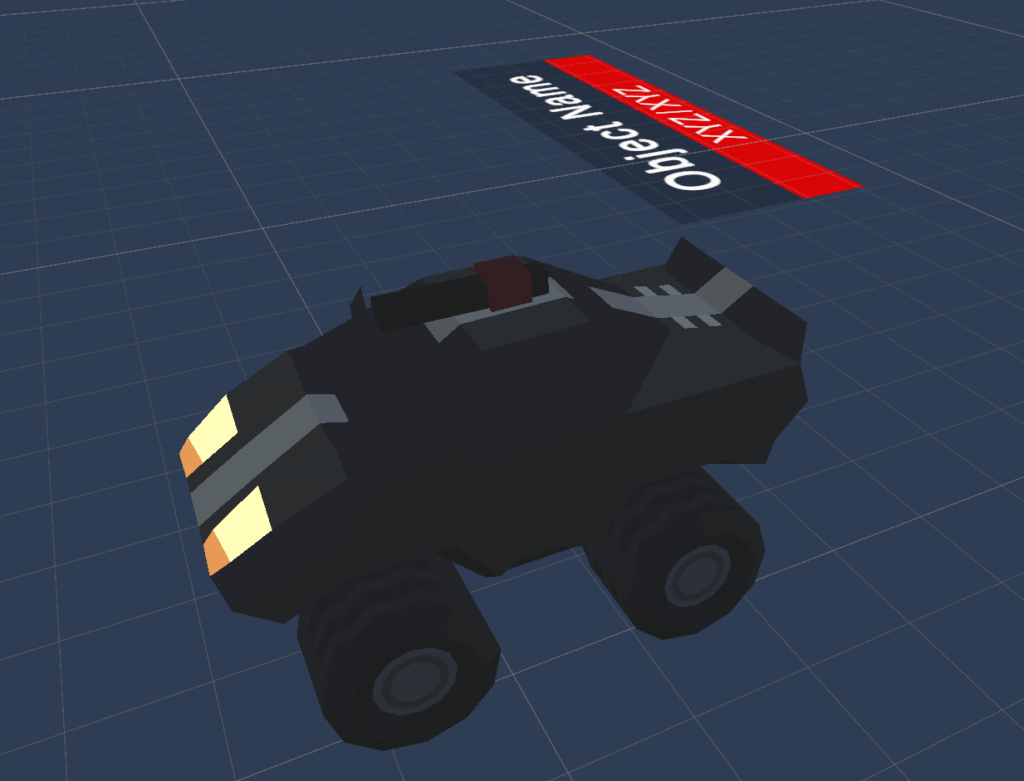
From the networking side, the vehicle uses standard Photon Fusion 2 components. The main vehicle object, Sport Car 1, includes a NetworkObject, which enables networking. NetworkRigidbody3D synchronises all Rigidbody and physics data. The Player component handles player input. PlayerVehicleController extends VehicleController, adding the following camera and letting you control the car with your input.
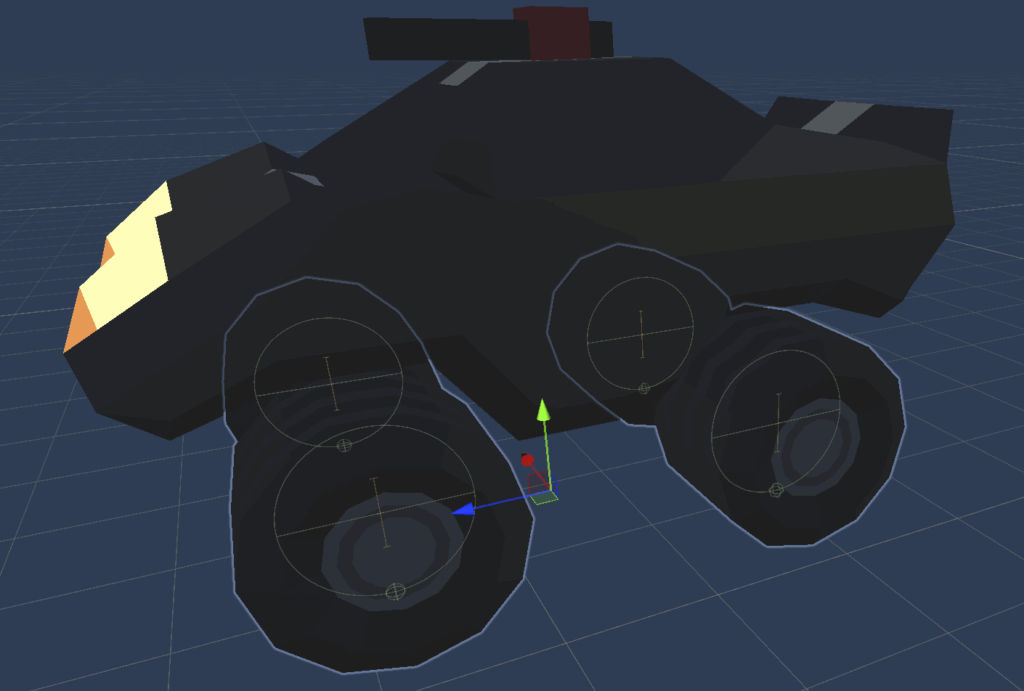
The prefab’s Wheels section splits into Meshes and Colliders. Meshes show the visual rotation and turning of each wheel. NetworkTransform components replicate their movement across the network.
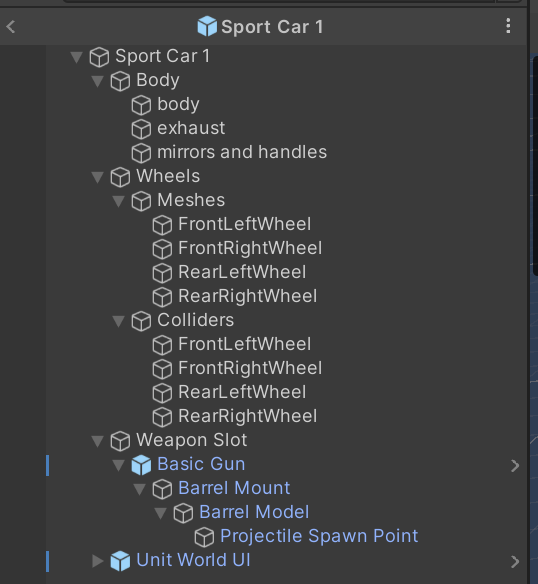
In this demo, only the Host calculates physics. The Host computes wheel movement and sends the result to the Clients. Clients do not run any local wheel physics; they just display the networked position and rotation for each wheel.
VehicleController.cs
Expand/Collapse Code
using Fusion;
using Fusion.Addons.Physics;
using UnityEngine;

namespace ProtoGDM
{
    public class VehicleController : DestructibleObject
    {
        #region Variables

        [Header("Configuration")]

        [SerializeField]
        private NetworkRigidbody3D networkRigidbody3D;

        [SerializeField]
        private WheelCollider frontLeftWheelCollider;

        [SerializeField]
        private WheelCollider frontRightWheelCollider;

        [SerializeField]
        private WheelCollider rearLeftWheelCollider;

        [SerializeField]
        private WheelCollider rearRightWheelCollider;

        [SerializeField]
        private Transform frontLeftTransform;

        [SerializeField]
        private Transform frontRightTransform;

        [SerializeField]
        private Transform rearLeftTransform;

        [SerializeField]
        private Transform rearRightTransform;

        [Header("Settings")]

        [SerializeField]
        private DriveTypes driveType = DriveTypes.FWD;

        [SerializeField]
        private bool frontSteering = true;

        [SerializeField]
        private bool rearSteering = false;

        [SerializeField]
        private float rearSteeringFactor = 0.15f;

        [SerializeField]
        protected float maxAccelerationForce = 500f;

        [SerializeField]
        protected float maxBreakingForce = 500f;

        [SerializeField]
        protected float maxSteerAngle = 20f;

        [SerializeField]
        protected float minSteerAngle = 20f;

        [SerializeField]
        protected Vector3 centerOfMass;

        #endregion Variables

        #region Properties

        [SerializeField]
        private WeaponController weaponController;

        public WeaponController WeaponController
        {
            get
            {
                return weaponController;
            }

            set
            {
                weaponController = value;
            }
        }

        [SerializeField]
        private Collider hitCollider;

        public Collider HitCollider
        {
            get
            {
                return hitCollider;
            }
        }

        #endregion Properties

        #region Unity methods

        protected virtual void Start()
        {
            Rigidbody rigidbody = GetComponent<Rigidbody>();

            if (rigidbody)
            {
                rigidbody.automaticCenterOfMass = false;

                rigidbody.centerOfMass = centerOfMass;
            }
        }

        #endregion Unity methods

        #region Public methods

        public override void FixedUpdateNetwork()
        {
            base.FixedUpdateNetwork();

            if (!HasStateAuthority)
            {
                return;
            }

            AnimateWheel(frontLeftWheelCollider, frontLeftTransform);
            AnimateWheel(frontRightWheelCollider, frontRightTransform);

            AnimateWheel(rearLeftWheelCollider, rearLeftTransform);
            AnimateWheel(rearRightWheelCollider, rearRightTransform);
        }

        public void AssignInputAuthority(PlayerRef playerRef)
        {
            Object.AssignInputAuthority(playerRef);

            if (WeaponController)
            {
                WeaponController.Object.AssignInputAuthority(playerRef);
            }
        }

        public virtual void HandleAcceleration(float value)
        {
            switch (driveType)
            {
                case DriveTypes.FWD:

                    frontLeftWheelCollider.motorTorque = value;
                    frontRightWheelCollider.motorTorque = value;

                    break;
                case DriveTypes.RWD:

                    rearLeftWheelCollider.motorTorque = value;
                    rearRightWheelCollider.motorTorque = value;

                    break;
                case DriveTypes.AWD:

                    frontLeftWheelCollider.motorTorque = value;
                    frontRightWheelCollider.motorTorque = value;
                    rearLeftWheelCollider.motorTorque = value;
                    rearRightWheelCollider.motorTorque = value;

                    break;
            }
        }

        public virtual void HandleBraking(float value)
        {
            frontLeftWheelCollider.brakeTorque = value;
            frontRightWheelCollider.brakeTorque = value;
            rearLeftWheelCollider.brakeTorque = value;
            rearRightWheelCollider.brakeTorque = value;
        }

        public virtual void HandleSteering(float value)
        {
            if (frontSteering)
            {
                frontLeftWheelCollider.steerAngle = value;
                frontRightWheelCollider.steerAngle = value;
            }

            if (rearSteering)
            {
                rearLeftWheelCollider.steerAngle = -value * rearSteeringFactor;
                rearRightWheelCollider.steerAngle = -value * rearSteeringFactor;
            }
        }

        #endregion Public methods

        #region Private methods

        private void AnimateWheel(WheelCollider wheelCollider, Transform transform)
        {
            Vector3 position;
            Quaternion quaternion;

            wheelCollider.GetWorldPose(out position, out quaternion);

            transform.position = position;
            transform.rotation = quaternion;
        }

        #endregion Private methods
    }
}
PlayerVehicleController.cs
Expand/Collapse Code
using Fusion;
using ProtoGDM.CameraManagement;
using ProtoGDM.UI;

namespace ProtoGDM
{
    public class PlayerVehicleController : VehicleController
    {
        public override void Spawned()
        {
            base.Spawned();

            CamerasManager.Instance.AddTarget(this);

            if (HasInputAuthority)
            {
                CamerasManager.Instance.SetFollow(this);

                GameplayUIManager.Instance.RegisterVehicleControllerEvents(this);
            }
        }

        public override void Despawned(NetworkRunner runner, bool hasState)
        {
            base.Despawned(runner, hasState);

            if (CamerasManager.InstExists)
            {
                CamerasManager.Instance.RemoveTarget(this);
            }

            if (HasInputAuthority)
            {
                if (CamerasManager.InstExists)
                {
                    CamerasManager.Instance.SetFollow(null);

                    CamerasManager.Instance.SetCameraMode(CamerasManager.CameraModeTypes.Free);
                }

                if (GameplayUIManager.InstExists)
                {
                    GameplayUIManager.Instance.UnregisterVehicleControllersEvents(this);
                }
            }
        }

        public override void HandleAcceleration(float value)
        {
            float finalAcceleration = maxAccelerationForce * value;

            base.HandleAcceleration(finalAcceleration);
        }

        public override void HandleBraking(float value)
        {
            float finalBraking = maxBreakingForce * value;

            base.HandleBraking(finalBraking);
        }

        public override void HandleSteering(float value)
        {
            float finalSteering = maxSteerAngle * value;

            base.HandleSteering(finalSteering);
        }
    }
}
Player.cs
Expand/Collapse Code
using Fusion;
using ProtoGDM.UI;
using UnityEngine;

namespace ProtoGDM.Networking
{
    public class Player : NetworkBehaviour
    {
        #region Variables

        [SerializeField]
        private PlayerVehicleController playerVehicleController;

        [Networked]
        public NetworkButtons NetworkButtonsPrevious
        {
            get;
            set;
        }

        #endregion Variables

        #region Photon methods

        public override void FixedUpdateNetwork()
        {
            if (!HasStateAuthority)
            {
                return;
            }

            if (playerVehicleController)
            {
                if (GetInput(out NetworkInputData input))
                {
                    // Acceleration
                    playerVehicleController.HandleAcceleration(input.acceleration);

                    // Braking
                    playerVehicleController.HandleBraking(input.braking);

                    // Steering
                    playerVehicleController.HandleSteering(input.steering);

                    // Weapon
                    var pressed = input.networkButtons.GetPressed(NetworkButtonsPrevious);

                    NetworkButtonsPrevious = input.networkButtons;

                    // Shooting
                    if (playerVehicleController.WeaponController)
                    {
                        playerVehicleController.WeaponController.HandleWeaponAimingWorldPoint(input.targetPoint);

                        playerVehicleController.WeaponController.HandleWeaponShooting(Runner, input.shooting);

                        if (pressed.IsSet(NetworkInputData.ButtonTypes.Reload))
                        {
                            playerVehicleController.WeaponController.Reload();
                        }
                    }
                }
            }
        }

        public override void Spawned()
        {
            if (HasInputAuthority)
            {
                GameplayUIManager.Instance.ShowGameplayInfo();
                GameplayUIManager.Instance.HideFreeCameraInfo();
            }
        }

        public override void Despawned(NetworkRunner runner, bool hasState)
        {
            if (HasInputAuthority)
            {
                if (GameplayUIManager.InstExists)
                {
                    GameplayUIManager.Instance.HideGameplayInfo();
                    GameplayUIManager.Instance.ShowFreeCameraInfo();
                }
            }
        }

        #endregion Photon methods
    }
}
Now let’s talk about the vehicle’s weapon. The weapon uses its own prefab and acts as an independent networked object, which you nest in the vehicle’s hierarchy. Correctly replicating these nested objects is essential for multiplayer games – review this process in the previous article if you need a refresher (link).
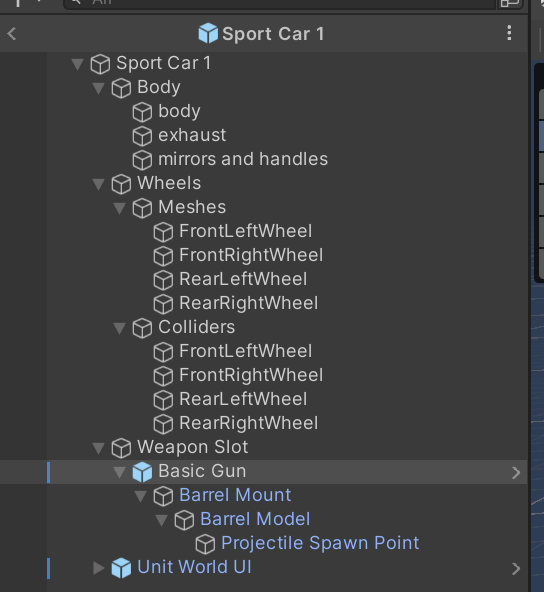
The roof-mounted weapon uses the WeaponController component. This component acts as a networked object with a state. It controls all fired projectiles and maintains a collection of projectiles currently flying toward their targets. Each projectile has a lifetime, a flight speed, and its own visual prefab. Unlike vehicles and weapons, each projectile exists only locally – it is not a networked object. Only the local player sees its visuals. The weapon keeps a list of projectiles and simulates their state on the Host, which owns StateAuthority. The Host then replicates this simulation to all Clients. Both Host and Clients use the synchronised state to visualise the projectiles with the same prefabs.
The base class NetworkBehaviourWithState<T> simplifies synchronisation. It stores all networked properties in a dedicated structure, NetworkState. Here, NetworkState holds a NetworkArray<ShotState>, which describes all active projectiles. Each ShotState implements ISparseState, allowing local prediction (extrapolation) of projectile paths without sending every update over the network.
This approach perfectly separates the visual and logical layers. Only the Host, which has StateAuthority, runs gameplay logic such as collision detection, damage calculation, and projectile destruction. The BulletProcessor method, running in FixedUpdateNetwork(), handles this logic on the Host. Clients do not run logic or have authority over projectiles. Instead, they visualise the state they receive by rendering projectiles with their local prefabs. The Projectile class, which implements ISparseVisual, handles this rendering.
SparseCollection connects logic to visuals. It links ShotState data with Projectile prefabs and manages their lifecycle, updates, and synchronisation. This approach allows you to create and synchronise hundreds of projectiles efficiently, using very little network bandwidth. Even better, you can completely decouple visuals from logic. For example, you can run the game in headless mode without any visuals, or add advanced effects like muzzle flashes and hit particles – none of this affects the game logic or network synchronisation.
WeaponController.cs
Expand/Collapse Code
using Fusion;
using FusionHelpers;
using ProtoGDM.Networking;
using System;
using UnityEngine;

namespace ProtoGDM
{
    public abstract class WeaponController : NetworkBehaviourWithState<NetworkState>
    {
        [Networked]
        public override ref NetworkState State => ref MakeRef<NetworkState>();

        #region Events

        public event Action<int> OnCurrentAmmoChange;

        public event Action<int> OnMaxAmmoChange;

        public event Action<float> OnCooldownStart;

        public event Action OnCooldownComplete;

        public event Action<float> OnCooldownChange;

        public event Action<float> OnReloadStart;

        public event Action OnReloadComplete;

        public event Action<float> OnReloadChange;

        #endregion Events

        #region Variables

        [Header("Weapon Configuration")]

        [SerializeField]
        protected Transform baseTransform;

        [SerializeField]
        protected Projectile projectilePrefab;

        [SerializeField]
        protected float damageFactor = 1f;

        protected SparseCollection<ShotState, Projectile> bullets;

        protected float cooldownTime;

        protected float reloadTime;

        #endregion Variables

        #region Properties

        public bool IsReady
        {
            get
            {
                return !IsReloading && !IsCooldown && CurrentAmmo > 0;
            }
        }

        [Networked, OnChangedRender(nameof(IsReloadingChanged))]
        public bool IsReloading
        {
            get;
            set;
        }

        [Networked, OnChangedRender(nameof(ReloadProgressChanged))]
        public float ReloadProgress
        {
            get;
            set;
        }

        [Networked, OnChangedRender(nameof(IsCooldownChanged))]
        public bool IsCooldown
        {
            get;
            set;
        }

        [Networked, OnChangedRender(nameof(CooldownProgressChanged))]
        public float CooldownProgress
        {
            get;
            set;
        }

        [Networked, OnChangedRender(nameof(CurrentAmmoChanged))]
        public int CurrentAmmo
        {
            get;
            set;
        }

        [Networked, OnChangedRender(nameof(MaxAmmoChanged))]
        public int MaxAmmo
        {
            get;
            set;
        }

        [SerializeField]
        private float reloadInterval = 1f;

        public float ReloadInterval
        {
            get
            {
                return reloadInterval;
            }

            protected set
            {
                if (reloadInterval != value)
                {
                    reloadInterval = value;
                }
            }
        }

        [SerializeField]
        private float fireInterval = 1f;

        public float FireInterval
        {
            get
            {
                return fireInterval;
            }

            protected set
            {
                if (fireInterval != value)
                {
                    fireInterval = value;
                }
            }
        }

        [SerializeField]
        private bool autoReload = true;

        public bool AutoReload
        {
            get
            {
                return autoReload;
            }

            protected set
            {
                if (autoReload != value)
                {
                    autoReload = value;
                }
            }
        }

        #endregion Properties

        #region Abstract methods

        public abstract void HandleWeaponAimingWorldPoint(Vector3 target);

        public abstract void HandleWeaponShooting(NetworkRunner networkRunner, bool input);

        #endregion Abstract methods

        #region Public methods

        public override void Spawned()
        {
            CurrentAmmo = MaxAmmo;

            bullets = new SparseCollection<ShotState, Projectile>(State.bulletStates, projectilePrefab);
        }

        public override void Despawned(NetworkRunner runner, bool hasState)
        {
            if (bullets != null)
            {
                bullets.Clear();
            }
        }

        public override void FixedUpdateNetwork()
        {
            if (!HasStateAuthority)
            {
                return;
            }

            if (bullets != null)
            {
                bullets.Process(this, BulletProcessor);
            }

            if (IsReloading)
            {
                reloadTime -= Runner.DeltaTime;

                if (reloadTime < 0f)
                {
                    reloadTime = 0f;
                }

                ReloadProgress = 1f - reloadTime / ReloadInterval;

                if (ReloadProgress == 1f)
                {
                    CurrentAmmo = MaxAmmo;

                    IsReloading = false;
                }
            }

            if (IsCooldown)
            {
                cooldownTime -= Runner.DeltaTime;

                if (cooldownTime < 0f)
                {
                    cooldownTime = 0f;
                }

                CooldownProgress = 1f - cooldownTime / FireInterval;

                if (CooldownProgress == 1f)
                {
                    IsCooldown = false;
                }
            }
        }

        public override void Render()
        {
            NetworkState from;
            NetworkState to;

            if (TryGetStateChanges(out from, out to))
            {
                int len = Mathf.Min(from.bulletStates.Length, to.bulletStates.Length);

                for (int i = 0; i < len; i++)
                {
                    ShotState oldState = from.bulletStates[i];

                    ShotState newState = to.bulletStates[i];

                    if (oldState.StartTick != newState.StartTick)
                    {
                        // TODO: Shot sound effect & visual effect.
                    }
                    else if (oldState.EndTick != newState.EndTick)
                    {
                        if (newState.Position.y < -0.15f)
                        {
                            // TODO: Miss sound effect & visual effect.
                        }
                        else
                        {
                            // TODO: Hit sound effect & visual effect.
                        }
                    }
                }
            }
            else
            {
                Tick fromTick;
                Tick toTick;
                float alpha;

                TryGetStateSnapshots(out from, out fromTick, out to, out toTick, out alpha);
            }

            if (bullets != null)
            {
                bullets.Render(this, from.bulletStates);
            }
        }

        public void SetDamageFactor(float value)
        {
            damageFactor = value;
        }

        public void Cooldown(float progress = 0f)
        {
            cooldownTime = FireInterval;

            CooldownProgress = progress;

            IsCooldown = true;
        }

        public void Reload(float progress = 0f)
        {
            reloadTime = ReloadInterval;

            ReloadProgress = progress;

            IsReloading = true;
        }

        #endregion Public methods

        #region Private methods

        private void IsCooldownChanged()
        {
            if (IsCooldown)
            {
                OnCooldownStart?.Invoke(0f);
            }
            else
            {
                OnCooldownComplete?.Invoke();
            }
        }

        private void CooldownProgressChanged()
        {
            OnCooldownChange?.Invoke(CooldownProgress);
        }

        private void IsReloadingChanged()
        {
            if (IsReloading)
            {
                OnReloadStart?.Invoke(0f);
            }
            else
            {
                OnReloadComplete?.Invoke();
            }
        }

        private void ReloadProgressChanged()
        {
            OnReloadChange?.Invoke(ReloadProgress);
        }

        private void CurrentAmmoChanged()
        {
            OnCurrentAmmoChange?.Invoke(CurrentAmmo);
        }

        private void MaxAmmoChanged()
        {
            OnMaxAmmoChange?.Invoke(MaxAmmo);
        }

        /// <summary>
        /// Method processing single <see cref="ShotState"/>.
        /// </summary>
        /// <param name="shotState"></param>
        /// <param name="tick"></param>
        /// <returns>True if state was modified.</returns>
        private bool BulletProcessor(ref ShotState shotState, int tick)
        {
            if (shotState.Position.y < -0.15f)
            {
                shotState.EndTick = Runner.Tick;

                return true;
            }

            if (shotState.EndTick > Runner.Tick)
            {
                Vector3 normalizedDirection = shotState.Direction.normalized;

                float step = projectilePrefab.Speed * Runner.DeltaTime;

                if (Physics.Raycast(
                        shotState.Position - normalizedDirection * step,
                        normalizedDirection,
                        out var hit,
                        step,
                        projectilePrefab.HitMask.value,
                        QueryTriggerInteraction.Ignore))
                {
                    shotState.Position = hit.point;
                    shotState.EndTick = Runner.Tick;

                    if (hit.collider)
                    {
                        DestructibleObject destructibleObject = hit.collider.GetComponentInParent<DestructibleObject>();

                        if (destructibleObject != null)
                        {
                            destructibleObject.TakeDamage(projectilePrefab.Damage * damageFactor);
                        }
                    }

                    return true;
                }
            }

            return false;
        }

        #endregion Private methods
    }
}
NetworkBehaviourWithState.cs (Photon Fusion 2)
Expand/Collapse Code
using Fusion;

namespace FusionHelpers
{
    /// <summary>
    /// Baseclass for Network Behaviours that follow a pattern of keeping all networked properties in its own struct.
    /// This reduces the amount of boilerplate needed to manage snapshots and change detection, at the cost of some flexibility.
    /// For example, you can check for changes and get both previous and current states with a single call, but you won't know exactly which properties changed.
    /// You can also acquire previous and current snapshots without dealing with property readers.
    /// Networked data is accessed via the `State` property which can be a useful visual hint when reading (and writing) code.
    /// (Note that while you *can* add networked state outside of the provided struct,
    /// it is not recommended since it most likely leads to extra calls to change detectors and is just generally confusing)
    /// </summary>
    /// <typeparam name="T">The struct that declares the networked state of this behaviour</typeparam>

    public abstract class NetworkBehaviourWithState<T> : NetworkBehaviour where T : unmanaged, INetworkStruct
    {
        public abstract ref T State { get; }

        private ChangeDetector _changesSimulation;
        private ChangeDetector _changesFrom;
        private ChangeDetector _changesTo;

        protected bool TryGetStateChanges(out T previous, out T current, ChangeDetector.Source source = ChangeDetector.Source.SimulationState)
        {
            switch (source)
            {
                default:
                case ChangeDetector.Source.SimulationState:
                    return TryGetStateChanges(source, ref _changesSimulation, out previous, out current);
                case ChangeDetector.Source.SnapshotFrom:
                    return TryGetStateChanges(source, ref _changesFrom, out previous, out current);
                case ChangeDetector.Source.SnapshotTo:
                    return TryGetStateChanges(source, ref _changesTo, out previous, out current);
            }
        }

        private bool TryGetStateChanges(ChangeDetector.Source source, ref ChangeDetector changes, out T previous, out T current)
        {
            if (changes == null)
                changes = GetChangeDetector(source);

            if (changes != null)
            {
                foreach (var change in changes.DetectChanges(this, out var previousBuffer, out var currentBuffer))
                {
                    switch (change)
                    {
                        case nameof(State):
                            var reader = GetPropertyReader<T>(change);
                            current = currentBuffer.Read(reader);
                            previous = previousBuffer.Read(reader);
                            return true;
                    }
                }
            }
            current = default;
            previous = default;
            return false;
        }

        protected bool TryGetStateSnapshots(out T from, out Tick fromTick, out T to, out Tick toTick, out float alpha)
        {
            if (TryGetSnapshotsBuffers(out var fromBuffer, out var toBuffer, out alpha))
            {
                var reader = GetPropertyReader<T>(nameof(State));
                from = fromBuffer.Read(reader);
                to = toBuffer.Read(reader);
                fromTick = fromBuffer.Tick;
                toTick = toBuffer.Tick;
                return true;
            }

            from = default;
            to = default;
            fromTick = default;
            toTick = default;
            return false;
        }
    }
}
SparseCollection.cs (Photon Fusion 2)
Expand/Collapse Code
using Fusion;
using UnityEngine;
using Object = UnityEngine.Object;

namespace FusionHelpers
{
    /// <summary>
    /// ISparseState represents the networked part of a simple object that require infrequent (network) updates,
    /// but still needs a visual game object rendered every frame on all clients.
    /// For example, a bullet following a straight line can be rendered just knowing its start location and velocity.
    /// </summary>
    /// <typeparam name="P">The MonoBehaviour that represents this state visually</typeparam>
    public interface ISparseState<P> : INetworkStruct where P : MonoBehaviour
    {
        public int StartTick { get; set; }
        public int EndTick { get; set; }

        /// <summary>
        /// The extrapolate method should update properties on the state struct using the given local time t
        /// (local time is the offset in seconds from StartTick).
        /// Note that these changes are just local predictions/extrapolations - they will not automatically be networked.
        /// (See the SparseCollection.Process method if you need to update state on State Authority)
        /// </summary>
        /// <param name="t">Local time in seconds to extrapolate to (t is 0 at Runner.Tick==StartTick)</param>
        /// <param name="prefab">Prefab used to create the visual (handy for accessing visual object configuration -
        /// Keep in mind that this is the prefab, it is *NOT* (guaranteed to be) the actual game object used to visualize this state)</param>
        public void Extrapolate(float t, P prefab);
    }

    /// <summary>
    /// ISparseVisual is implemented by local game objects that "visualize" an ISparseState.
    /// </summary>
    /// <typeparam name="T">The actual type of the sparse state</typeparam>
    /// <typeparam name="P">The MonoBehaviour used to visualise the sparse state</typeparam>
    public interface ISparseVisual<T, P> where T : unmanaged, ISparseState<P> where P : MonoBehaviour, ISparseVisual<T, P>
    {
        /// <summary>
        /// This method is called every frame to update the visual game object to match the current render state.
        /// </summary>
        /// <param name="owner">The NB that owns the collection of sparse states</param>
        /// <param name="state">The current render state of this particular visual</param>
        /// <param name="t">The current local time that the state represents</param>
        /// <param name="isFirstRender">True the first time this is called for a new visual</param>
        /// <param name="isLastRender">True the last time this is called for a given visual</param>
        public void ApplyStateToVisual(NetworkBehaviour owner, T state, float t, bool isFirstRender, bool isLastRender);
    }

    /// <summary>
    /// The sparse collection maps sparse states to sparse visuals and keeps track of the somewhat complex timing involved
    /// </summary>
    /// <typeparam name="T">The actual type of the sparse state</typeparam>
    /// <typeparam name="P">The MonoBehaviour used to visualise the sparse state</typeparam>
    public class SparseCollection<T, P> where T : unmanaged, ISparseState<P> where P : MonoBehaviour, ISparseVisual<T, P>
    {
        // Internal struct for keeping track of matching states and visuals
        private struct Entry
        {
            public P visual;
            public bool enabled;
        }

        // To give proxies a chance to disable the local GO before it's re-used, we wait a few additional ticks before re-using a state.
        private const int REUSE_DELAY_TICKS = 24;

        // Reference to the raw networked state data
        private NetworkArray<T> _states;

        // State to visual map
        private Entry[] _entries;

        // Prefab used for visuals
        private readonly P _prefab;

        // Last time render was called - used to make sure we don't miss updates if framerate is low
        private float _nextRenderTime;

        /// <summary>
        /// The sparse collection itself is not a networked object, so you need to create its backing data elsewhere (in a NB)
        /// and pass it to the constructor along with a reference to the prefab to use for the associated visuals.
        /// Once created, call
        /// * Render() from the NetworkBehaviour's Render() method, passing in the relevant snapshot
        /// * Process() from the NetworkBehaviour's FixedUpdateNetwork() method if you want to alter state, and
        /// * Add() from Input or State auth to "spawn" a new object.
        /// </summary>
        /// <param name="states">Networked array of sparse state structs</param>
        /// <param name="prefab">Prefab to use for visuals</param>
        public SparseCollection(NetworkArray<T> states, P prefab)
        {
            _entries = new Entry[states.Length];
            _states = states;
            _prefab = prefab;
        }

        /// <summary>
        /// Call Render() every frame to update visuals to their associated sparse state.
        /// </summary>
        /// <param name="owner">The <see cref="NetworkBehaviour"/> that contains the networked state objects</param>
        public void Render(NetworkBehaviour owner, NetworkArray<T> states)
        {
            NetworkRunner runner = owner.Runner;

            float renderTime = owner.Object.RenderTime;

            for (int i = 0; i < _entries.Length; i++)
            {
                Entry entry = _entries[i];

                T state = states[i];

                if (!entry.enabled && entry.visual && entry.visual.gameObject.activeSelf)
                {
                    entry.visual.gameObject.SetActive(false);
                }

                // Note: t may be less than zero if we're rendering across several ticks and StartTick is somewhere in-between.
                // (E.g. from=100, to=102 with start=101 and alpha=0.25 will place us ahead of the start tick)
                float t = renderTime - state.StartTick * runner.DeltaTime;
                float t1 = (state.EndTick - state.StartTick) * runner.DeltaTime;

                bool isLastRender = t >= t1 && entry.enabled;
                bool isFirstRender = false;

                // We delay disabling of the object one frame since "last render" isn't really a last render if the object is immediately hidden.
                entry.enabled = t >= 0 && t < t1;

                // Make sure we have a valid enabled GameObject if this state represents an active instance
                if (entry.enabled || isLastRender)
                {
                    if (!entry.visual)
                    {
                        entry.visual = Object.Instantiate(_prefab);
                        isFirstRender = true;
                    }

                    if (!entry.visual.gameObject.activeSelf)
                    {
                        entry.visual.gameObject.SetActive(true);
                        isFirstRender = true;
                    }

                    if (isFirstRender)
                    {
                        ApplyState(state, entry, 0, true, false);
                    }

                    if (!isFirstRender && !isLastRender)
                    {
                        ApplyState(state, entry, t, false, false);
                    }

                    if (isLastRender)
                    {
                        ApplyState(state, entry, t1, false, true);
                    }
                }
                // Done modifying the entry struct, copy it back to the array
                _entries[i] = entry;
            }

            void ApplyState(T state, Entry e, float t, bool isFirstRender, bool isLastRender)
            {
                // Update state to t
                state.Extrapolate(t, _prefab);

                // Update visual to match the state
                e.visual.ApplyStateToVisual(owner, state, t, isFirstRender, isLastRender);
            }
        }

        public delegate bool Processor(ref T state, int tick);

        /// <summary>
        /// Call process every tick if you want to adjust *networked* properties on the sparse state.
        /// As the name suggests, these updates should be infrequent, so if you *do* change the state
        /// you must return true from the delegate to update the backing array.
        /// </summary>
        /// <param name="owner">The <see cref="NetworkBehaviour"/> that owns the sparse state list</param>
        /// <param name="processor">A delegate that will process each (active) sparse state</param>
        public void Process(NetworkBehaviour owner, Processor processor)
        {
            if (owner.IsProxy)
                return;

            NetworkRunner runner = owner.Runner;

            int simTtick = runner.Tick;

            for (int i = 0; i < _states.Length; i++)
            {
                T state = _states[i];

                float t = (simTtick - state.StartTick) * runner.DeltaTime;

                if (simTtick <= state.EndTick)
                {
                    state.Extrapolate(t, _prefab);

                    if (processor(ref state, simTtick))
                    {
                        // Since we're storing the extrapolated state, we must also update the start tick, as this is our new starting point going forward.
                        state.StartTick = simTtick;
                        // Update the networked backing storage so the change is propagated
                        _states[i] = state;
                    }
                }
            }
        }

        /// <summary>
        /// Call Add to "instantiate" (or rather, "activate") a new sparse state. Note that this will not allocate
        /// but simply select the next in-active sparse state in the array. It will do nothing if none is found.
        /// </summary>
        /// <param name="runner"></param>
        /// <param name="state">The initial state to add</param>
        /// <param name="secondsToLive">Initial number of ticks for the sparse state to be alive</param>
        public void Add(NetworkRunner runner, T state, float secondsToLive)
        {
            state.StartTick = runner.Tick;
            state.EndTick = state.StartTick + Mathf.Max(1, (int)(secondsToLive / runner.DeltaTime));

            for (int i = 0; i < _states.Length; i++)
            {
                if (runner.Tick > _states[i].EndTick + REUSE_DELAY_TICKS)
                {
                    _states[i] = state;

                    return;
                }
            }

            Debug.LogWarning("No free slots in state array!");
        }

        /// <summary>
        /// Call Clear to destroy all visuals for this sparse set.
        /// </summary>
        public void Clear()
        {
            for (int i = 0; i < _entries.Length; i++)
            {
                Entry entry = _entries[i];

                if (entry.visual)
                {
                    Object.Destroy(entry.visual.gameObject);
                }

                _entries[i] = default;
            }
        }
    }
}
NetworkState.cs
Expand/Collapse Code
using Fusion;

namespace ProtoGDM.Networking
{
    public struct NetworkState : INetworkStruct
    {
        #region Properties

        [Networked, Capacity(64)]
        public NetworkArray<ShotState> bulletStates
        {
            get
            {
                return default;
            }
        }

        #endregion Properties
    }
}
ShotState.cs
Expand/Collapse Code
using FusionHelpers;
using UnityEngine;

namespace ProtoGDM.Networking
{
    public struct ShotState : ISparseState<Projectile>
    {
        #region Properties

        public Vector3 Position
        {
            get;
            set;
        }

        public Vector3 Direction
        {
            get;
            set;
        }

        public int StartTick
        {
            get;
            set;
        }

        public int EndTick
        {
            get;
            set;
        }

        #endregion Properties

        #region Constructors

        public ShotState(Vector3 startPosition, Vector3 direction)
        {
            StartTick = 0;
            EndTick = 0;
            Position = startPosition;
            Direction = direction;
        }

        #endregion Constructors

        #region Public methods

        public void Extrapolate(float time, Projectile projectile)
        {
            Position = GetPositionAt(time, projectile);
            Direction = GetDirectionAt(time, projectile);
        }

        public Vector3 GetTargetPosition(Projectile projectile)
        {
            float a = 0.5f * projectile.Gravity.y;
            float b = projectile.Speed * Direction.y;
            float c = Position.y;
            float d = b * b - 4 * a * c;
            float t = (-b - Mathf.Sqrt(d)) / (2 * a);
            Vector3 p = GetPositionAt(t, projectile);
            p.y = 0.05f; // Return the position with a slight y offset to avoid placing target where it will end up z-fighting with the ground;

            return p;
        }

        #endregion Public methods

        #region Private methods

        private Vector3 GetPositionAt(float time, Projectile projectile)
        {
            return Position + time * (projectile.Speed * Direction + 0.5f * time * projectile.Gravity);
        }

        private Vector3 GetDirectionAt(float time, Projectile projectile)
        {
            return projectile.Speed == 0 ? Direction : (projectile.Speed * Direction + time * projectile.Gravity).normalized;
        }

        #endregion Private methods
    }
}
Projectile.cs
Expand/Collapse Code
using Fusion;
using FusionHelpers;
using ProtoGDM.Networking;
using UnityEngine;

namespace ProtoGDM
{
    public class Projectile : MonoBehaviour, ISparseVisual<ShotState, Projectile>
    {
        private Transform locTransform;

        #region Properties

        [SerializeField]
        private Vector3 gravity;

        public Vector3 Gravity
        {
            get
            {
                return gravity;
            }
        }

        [SerializeField]
        private float timeOfLife = 2f;

        public float TimeOfLife
        {
            get
            {
                return timeOfLife;
            }
        }

        [SerializeField]
        private LayerMask hitMask;

        public LayerMask HitMask
        {
            get
            {
                return hitMask;
            }
        }

        [SerializeField]
        private float speed = 50f;

        public float Speed
        {
            get
            {
                return speed;
            }
        }

        [SerializeField]
        private float damage = 10f;

        public float Damage
        {
            get
            {
                return damage;
            }
        }

        #endregion Properties

        private void Awake()
        {
            locTransform = transform;
        }

        #region Public methods

        public void ApplyStateToVisual(NetworkBehaviour owner, ShotState shotState, float time, bool isFirstRender, bool isLastRender)
        {
            locTransform.forward = shotState.Direction;
            locTransform.position = shotState.Position;
        }

        #endregion Public methods
    }
}
Turret
Turrets are another key part of this demo. Each turret is a stationary object with its own health and specific shooting parameters. A trigger collider defines the turret’s detection area. When a player vehicle enters this area, the turret rotates to face it and begins firing. The turret checks if an obstacle blocks its target. If it can’t get a clear shot, it looks for another player’s vehicle.
All logic for aiming, targeting, and controlling the turret runs on the Host – the side with State Authority. The turret’s rotation and barrel angles are synchronised with all Clients. When no player vehicles are in range, the turret enters search mode and spins on its axis to find a new target.
Projectile shooting, synchronisation, and visualisation work just like they do for the player vehicle. The system synchronises only the projectile states. Both the Host and Clients handle projectile visualisation locally whenever the state changes.
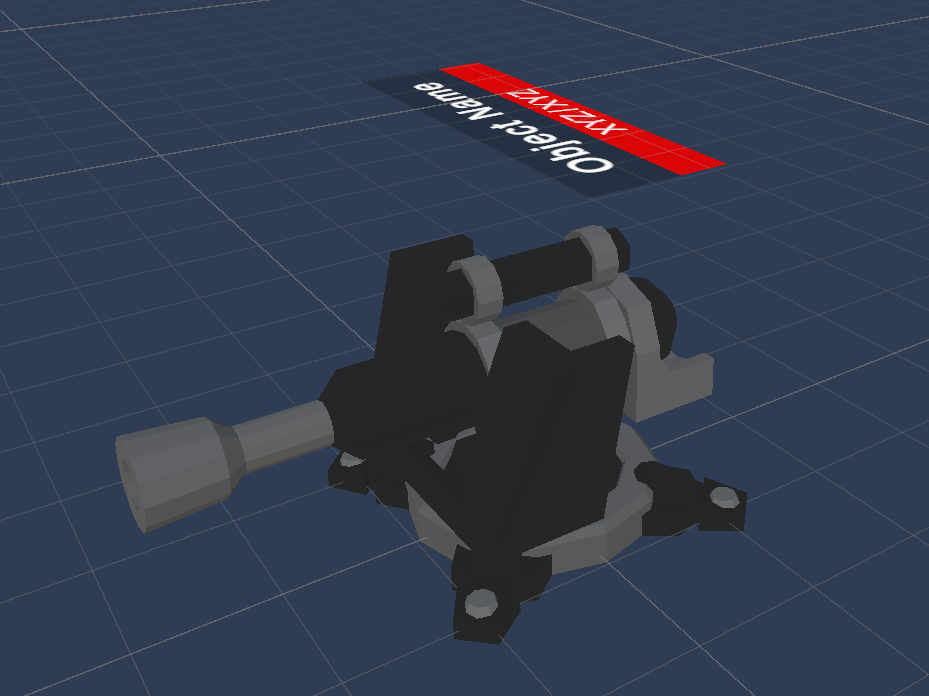
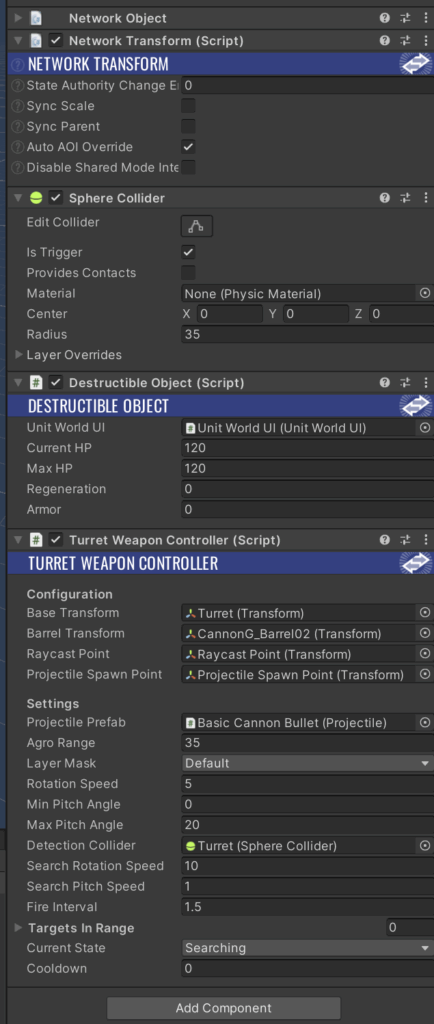
TurretController.cs
Expand/Collapse Code
using Fusion;
using FusionHelpers;
using ProtoGDM.Networking;
using System.Collections.Generic;
using UnityEngine;

namespace ProtoGDM
{
    public class TurretController : NetworkBehaviourWithState<NetworkState>
    {
        [Networked]
        public override ref NetworkState State => ref MakeRef<NetworkState>();

        #region Variables

        [Header("Configuration")]

        [SerializeField]
        protected Transform baseTransform;

        [SerializeField]
        protected Transform barrelTransform;

        [SerializeField]
        private Transform raycastPoint;

        [SerializeField]
        private Transform projectileSpawnPoint;

        [Header("Settings")]

        [SerializeField]
        private Projectile projectilePrefab;

        [SerializeField]
        private float agroRange = 10f;

        [SerializeField]
        private LayerMask layerMask;

        [SerializeField]
        protected float rotationSpeed = 5f;

        [SerializeField]
        protected float minPitchAngle = 0f;

        [SerializeField]
        protected float maxPitchAngle = 20f;

        [SerializeField]
        private SphereCollider detectionCollider;

        [SerializeField]
        private float searchRotationSpeed = 10f;

        [SerializeField]
        private float searchPitchSpeed = 1f;

        [SerializeField]
        private float fireInterval = 2f;

        [SerializeField]
        private List<PlayerVehicleController> targetsInRange = new List<PlayerVehicleController>();

        private float searchTime = 0f;

        protected SparseCollection<ShotState, Projectile> bullets;

        #endregion Variables

        #region Properties

        [Networked]
        public TurretStateTypes CurrentState
        {
            get;
            set;
        }

        [Networked]
        public float Cooldown
        {
            get;
            set;
        }

        #endregion Properties

        #region Unity methods

        public override void Spawned()
        {
            bullets = new SparseCollection<ShotState, Projectile>(State.bulletStates, projectilePrefab);

            if (detectionCollider != null)
            {
                detectionCollider.isTrigger = true;

                detectionCollider.radius = agroRange;
            }
            else
            {
                Debug.LogWarning("Detection Collider is not set on " + gameObject.name);
            }
        }

        public override void Despawned(NetworkRunner runner, bool hasState)
        {
            bullets.Clear();

            base.Despawned(runner, hasState);
        }

        public override void FixedUpdateNetwork()
        {
            if (!HasStateAuthority)
            {
                return;
            }

            bullets.Process(this, BulletProcessor);

            float deltaTime = Runner.DeltaTime;

            if (Cooldown > 0f)
            {
                Cooldown -= deltaTime;

                if (Cooldown < 0f)
                {
                    Cooldown = 0f;
                }
            }

            PlayerVehicleController currentTarget = null;

            for (int i = 0; i < targetsInRange.Count; i++)
            {
                if (targetsInRange[i])
                {
                    if (IsTargetVisible(targetsInRange[i]))
                    {
                        currentTarget = targetsInRange[i];

                        break;
                    }
                }
            }

            if (currentTarget)
            {
                CurrentState = TurretStateTypes.Tracking;

                AimAtTarget(currentTarget.transform.position);

                if (Cooldown == 0f)
                {
                    Shoot(Runner);

                    Cooldown = fireInterval;
                }
            }
            else
            {
                CurrentState = TurretStateTypes.Searching;

                SearchForTarget(deltaTime);
            }
        }

        public override void Render()
        {
            if (TryGetStateChanges(out var from, out var to))
            {

            }
            else
            {
                TryGetStateSnapshots(out from, out _, out _, out _, out _);
            }

            bullets.Render(this, from.bulletStates);
        }

        private void OnTriggerEnter(Collider other)
        {
            PlayerVehicleController vehicle = other.GetComponentInParent<PlayerVehicleController>();

            if (vehicle != null && !targetsInRange.Contains(vehicle))
            {
                targetsInRange.Add(vehicle);
            }
        }

        private void OnTriggerExit(Collider other)
        {
            PlayerVehicleController vehicle = other.GetComponentInParent<PlayerVehicleController>();

            if (vehicle != null)
            {
                targetsInRange.Remove(vehicle);
            }
        }

        private void OnDrawGizmosSelected()
        {
            if (targetsInRange == null)
            {
                return;
            }

            foreach (PlayerVehicleController vehicleController in targetsInRange)
            {
                if (vehicleController == null)
                {
                    continue;
                }

                Vector3 direction = (vehicleController.transform.position + Vector3.up) - raycastPoint.position;

                Ray ray = new Ray(raycastPoint.position, direction);

                RaycastHit raycastHit;

                if (Physics.Raycast(ray, out raycastHit, agroRange, layerMask, QueryTriggerInteraction.Ignore))
                {
                    if (vehicleController.HitCollider == raycastHit.collider)
                    {
                        Gizmos.color = Color.green;
                    }
                    else
                    {
                        Gizmos.color = Color.red;
                    }

                    Gizmos.DrawLine(raycastPoint.position, raycastHit.point);
                }
                else
                {
                    Gizmos.color = Color.red;
                    Gizmos.DrawLine(raycastPoint.position, raycastPoint.position + direction.normalized * agroRange);
                }
            }
        }

        #endregion Unity methods

        #region Private methods

        private bool IsTargetVisible(PlayerVehicleController vehicleController)
        {
            Vector3 direction = (vehicleController.transform.position + Vector3.up) - raycastPoint.position;

            Ray ray = new Ray(raycastPoint.position, direction);

            RaycastHit raycastHit;

            if (Physics.Raycast(ray, out raycastHit, agroRange, layerMask, QueryTriggerInteraction.Ignore))
            {
                if (vehicleController.HitCollider == raycastHit.collider)
                {
                    return true;
                }
            }

            return false;
        }

        private void SearchForTarget(float deltaTime)
        {
            baseTransform.Rotate(Vector3.up, searchRotationSpeed * deltaTime);

            searchTime += deltaTime * searchPitchSpeed;

            float pitchAngle = Mathf.Lerp(minPitchAngle, maxPitchAngle, (Mathf.Sin(searchTime) + 1f) * 0.5f);

            barrelTransform.localRotation = Quaternion.Euler(-pitchAngle, 0, 0);
        }

        private void AimAtTarget(Vector3 targetPosition)
        {
            Vector3 directionToTarget = targetPosition - baseTransform.position;

            Vector3 flatDirection = new Vector3(directionToTarget.x, 0, directionToTarget.z);

            if (flatDirection.sqrMagnitude > 0.001f)
            {
                Quaternion baseRotation = Quaternion.LookRotation(flatDirection);

                baseTransform.rotation = Quaternion.Euler(0, baseRotation.eulerAngles.y, 0);
            }

            Vector3 localTargetPosition = baseTransform.InverseTransformPoint(targetPosition);

            float distance = Mathf.Sqrt(localTargetPosition.z * localTargetPosition.z + localTargetPosition.x * localTargetPosition.x);

            float pitchAngle = Mathf.Atan2(localTargetPosition.y, distance) * Mathf.Rad2Deg;

            pitchAngle = Mathf.Clamp(pitchAngle, minPitchAngle, maxPitchAngle);

            barrelTransform.localRotation = Quaternion.Euler(-pitchAngle, 0, 0);
        }

        private void Shoot(NetworkRunner networkRunner)
        {
            if (Object.HasStateAuthority)
            {
                bullets.Add(networkRunner, new ShotState(projectileSpawnPoint.position, projectileSpawnPoint.forward), projectilePrefab.TimeOfLife);
            }
        }

        /// <summary>
        /// Method processing single <see cref="ShotState"/>.
        /// </summary>
        /// <param name="shotState"></param>
        /// <param name="tick"></param>
        /// <returns>True if state was modified.</returns>
        private bool BulletProcessor(ref ShotState shotState, int tick)
        {
            if (shotState.Position.y < -0.15f)
            {
                shotState.EndTick = Runner.Tick;

                return true;
            }

            if (shotState.EndTick > Runner.Tick)
            {
                Vector3 normalizedDirection = shotState.Direction.normalized;

                float step = projectilePrefab.Speed * Runner.DeltaTime;

                if (Physics.Raycast(
                        shotState.Position - normalizedDirection * step,
                        normalizedDirection,
                        out var hit,
                        step,
                        projectilePrefab.HitMask.value,
                        QueryTriggerInteraction.Ignore))
                {
                    shotState.Position = hit.point;
                    shotState.EndTick = Runner.Tick;

                    if (hit.collider)
                    {
                        DestructibleObject destructibleObject = hit.collider.GetComponentInParent<DestructibleObject>();

                        if (destructibleObject != null)
                        {
                            destructibleObject.TakeDamage(projectilePrefab.Damage * MissionSettings.Instance.GetDifficultyFactor());
                        }
                    }

                    return true;
                }
            }

            return false;
        }

        #endregion Private methods
    }
}
Reconnect
Every real-time multiplayer game is vulnerable to connection issues. At any moment, a Client can lose the connection to the Server or Host.
To ensure a good experience, your game should include reconnection mechanisms. These systems should automatically try to restore the connection if the problem is temporary. It’s also useful to let players return to a session after events like a PC restart, sudden crash, or power outage.
In our demo, we focus on the Host-Client topology. One player acts as the Host and knows the current state of the game. Only the Host can help a reconnecting Client recover the latest game state.
What is reconnect?
Reconnect means the player restores a stable connection after losing it. The game also has to rebuild the player’s knowledge of the current world state. While the player was offline, other participants kept playing and changed the world. Only the Host can decide if the player can rejoin and is responsible for sending the most up-to-date state.
If your game does not support reconnect, the Host assumes every disconnect is intentional. The game despawns the player’s objects and forgets their state. Supporting reconnect makes things more complex. The Host must decide whether the disconnect was intentional or not. They also need to save the player’s data for a while and identify if a reconnecting player is really the same person.
As described in the previous article, joining a Fusion 2 session is simple if you know the session name. The Host receives a callback and chooses to accept or reject the request. Fusion 2 does not have a built-in reconnect system. For the Host, a reconnecting player looks like a new player. The Host must check if the player is new or someone who lost connection earlier. To do this, use the ConnectionToken from StartGameArgs. See the NetworkManager class and JoinSession method in this article. The ConnectionToken allows the Host to recognize returning players. Here’s how the flow works:
- The Host creates a session.
- Player A joins and sends a unique ConnectionToken.
- The Host accepts Player A and saves their ConnectionToken.
- Player B joins and sends a unique ConnectionToken.
- The Host accepts Player B and saves their ConnectionToken.
- The Host starts the game. All players are in the session. Suddenly, Player A’s computer freezes. After restarting, they want to return.
- Player A remembers the session name and their ConnectionToken. They request to rejoin using NetworkManager.JoinSession.
- The Host receives OnConnectRequest and checks if the ConnectionToken matches a known player.
- If it matches, the Host knows it’s Player A.
- The Host accepts the player. Since this is not a new player, the Host does not spawn new objects. Instead, the Host restores Input Authority to Player A’s previous objects. This lets Player A regain control and synchronizes the current state.
This is the basic reconnect workflow. Here are a few common problems you may face.
Session slot reservation
Fusion 2 does not reserve session slots for reconnecting players. If a player disconnects unexpectedly, the Fusion backend eventually removes them from the session. Meanwhile, another player might see a free slot and try to join. Only your Host can check if the slot is really free, or if you’re waiting for a reconnect. There’s also another problem. The Fusion backend may be slower to detect disconnects than the Host. The Host checks client status more often. As a result, a reconnecting player might see a “session full” error even if the Host already knows they left. The backend still thinks the slot is occupied.
Password-protected sessions
You might use ConnectionToken to send a session password, but now you also need to use it to identify the player. Fusion 2 does not offer separate fields for passwords and reconnects, so you have to combine them. In this example, create a structure with both the player’s ID and password, serialize it to JSON, convert it to byte[], and use that as the ConnectionToken.
ConnectionToken.cs
Expand/Collapse Code
namespace ProtoGDM.Networking
{
    [Serializable]
    public class ConnectionToken
    {
        public string password;
        public string reconnectGuid;

        public ConnectionToken(string password, string reconnectGuid)
        {
            this.password = password;
            this.reconnectGuid = reconnectGuid;
        }

        public static byte[] ToBytes(ConnectionToken token)
        {
            string json = JsonUtility.ToJson(token);

            return Encoding.UTF8.GetBytes(json);
        }

        public static ConnectionToken FromBytes(byte[] data)
        {
            if (data == null || data.Length == 0)
            {
                return null;
            }

            string json = Encoding.UTF8.GetString(data);

            return JsonUtility.FromJson<ConnectionToken>(json);
        }
    }
}
The Host should not wait indefinitely for a disconnected player. Most games set a reconnect window of several seconds or a few minutes. After this time, the Host considers the player gone, removes their state, and deletes their ConnectionToken. If the player tries to reconnect after this period, Host treats them as a new participant and does not restore their previous state.
In our demo, you’ll find the roomPlayerMap dictionary in the NetworkManager class. This dictionary links each RoomPlayer object to the player’s unique identifier (string). When a player joins the game, the Host checks this dictionary in both OnConnectRequest and OnPlayerJoined.
- In OnConnectRequest, the Host verifies whether the player’s identifier is still mapped to a RoomPlayer. If not, the reconnect window has expired and the connection cannot be restored.
- In OnPlayerJoined, the Host tries to fetch the RoomPlayer object. If successful, the Host assigns InputAuthority and returns control to the player without creating new objects.
The RoomPlayer class also contains a networked property called IsDisconnected. This property lets other players know when someone has connection issues. For example, you can display a “Disconnected” message above the player’s vehicle.
Summary
This article wrapped up our Photon Fusion 2 series with a complete but very simple project. You learned how to structure a Unity project for multiplayer, set up and manage sessions, handle player data, synchronize gameplay objects, and implement reconnection logic for real-time games. We explored practical code examples, explained core networking concepts, and showed you how to combine all these systems in a working demo.
With this knowledge, you’re ready to design your own multiplayer mechanics, expand on the sample game, and take full advantage of Photon Fusion 2 in future projects. If you missed any previous articles, check out the earlier parts of the series. Good luck, and happy coding!